R167 Sprint: 8/1/2026 to 8/30/2026. To learn about product features that you may not recognize, contact ClientSpace Professional Services.
Release Schedule
Release updates are implemented by the group, as indicated in the following table.
The release schedule is subject to change and updated as required. To determine your group or ask questions, please log a case for ClientSpace Professional Services.
|
Sprint 8/1/2026 to 8/30/2026 |
||
|---|---|---|
|
Upgrade groups |
Date of upgrade |
Tentatively occurs on |
| Group 1 | First Tuesday of the month | September 8, 2026 |
| Group 2 | Second Tuesday of the month | September 15, 2026 |
| Group 3 | Third Tuesday of the month | September 22, 2026 |
Announcements
|
Summary |
Resolution |
|---|---|
|
Recommendations for Preparing for Next Year's Report Center Transition |
Just a friendly reminder that we will transition from Izenda reports to Sigma Report Center effective February 1st, 2027. To get up to speed on Sigma Report Center, please check out the following resources:
|
 icon in the left navigation panel.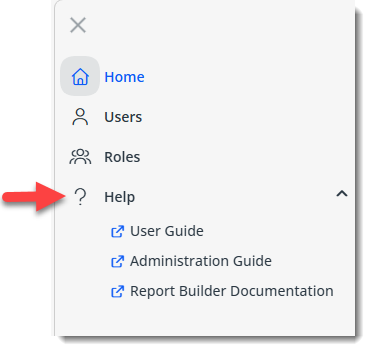
Enhancements
Enhancement groups are Change in Functionality, ClientSpace Premium (ClientSpace with additional modules), Advanced Administration, General, and Staffing.
ClientSpace Premium
Benefit Plan Manager (BPM)
Other ClientSpace Premium
|
Case |
Enhancement |
|---|---|
|
75496 |
Added Benefits API Export Logging The Benefits Export API now records status messages directly to the Benefits Batch record. When an export is performed, the system stamps a success message or a detailed error log in the Prism Log field, including the user who initiated the export and the date/time of the action. |
|
77482 |
Added Suppress OE Auto-Term and Maximum Age Fields for PrismHR Import/Export The Offered Benefit Plan (OBP) dataform now includes two, new fields:
Both fields are fully integrated with the following PrismHR API import and export business rule methods, import and update processes, and business logic:
See: |
|
77486, 78967 |
Added "Round-Robin" Group Users Assignment Note: If you are interested in this feature, please contact the ClientSpace Professional Services team or log an Extranet ticket. A new Group Users Assignment feature has been added which enables round-robin assignment of users from a group instead of assigning static users in User fields (i.e., fields with a datatype of User). EX: Assigned To User on the Client Service Case dataform.
With Group Users Assignment, the system selects the next available user (i.e., group member) in the list of users based on a sequence order. The Group Users Assignment feature currently works on:
Additional integration points will be added as this feature is enhanced over time. |
|
77823 |
Updated Benefit Plan Suppression Options Previously, selecting the "Suppress from Entire Presentation" option in the Suppress from Presentation field on the Benefit Plan dataform suppressed the benefit plan from displaying in all locations of BPM, the Benefits Renewal Workbook merge, and prevented the plan from being exported in the Benefit Plan Export API and Benefit Rules Export. Now, selecting the "Suppress from Entire Presentation" option continues to suppress the benefit plan from displaying in various locations but no longer prevents the benefit plan from being exported in the Benefit Plan Export API or Benefit Rules Export. Additionally, with this update, new lookup value, "Suppress from Presentation and Exporting," has been added to the Suppress from Presentation field. This option allows you to suppress a plan from the entire presentation while also excluding it from API exports. See: |
|
78202 |
Added PrismHR Payee ID Field to Organization Detail > Other Info Tab A new PrismHR Payee ID text field has been added to the Other Info tab in the "Carrier Details" fieldset of the Organization Detail dataform. The field was added to support the future Group Benefits Export API as a way to identify the benefit plan payee (carrier) sent from PrismHR. |
|
78229 |
Automated Benefit Batch Cancellation for Terminated Clients A new business rule named CancelClientBenefitBatches has been added. The rule is triggered when the Status field on a Client Master record is updated to Pending Termination, Terminated, Dead, or Expired. The rule automatically transitions all associated Active Benefit Batches (which are not already in Cancelled or Expired status) to a Cancelled status. This automation ensures that administrative work is not continued for invalid clients, preventing downstream errors in renewals and reporting. Each affected Benefits Batch includes an automatic date and time stamped entry in the Update Log field detailing the cancellation reason: "Auto-cancelled due to Client Status = {Pending Termination, Terminated, Dead, Expired}." Note: The business rule is Active by default. |
|
78413 |
Updated Benefit Plan Category Metadata A new multi-lookup field, Associated Offer Type, has been added to Benefit Plan Category metadata to allow mapping of Prism Offer Types. This update includes default mappings for standard categories and a new "Bond" lookup value to improve accuracy when importing and exporting system-level benefit plans. |
|
78725 |
Updated Benefits Plan Export API Logic for "Manually Set Percentages" Contribution Method Previously, when exporting benefit plans using the Benefit Plan Export API where plans had a Contribution Method of "Manually Set Percentages", the amounts exported correctly, but the percentages did not. The Benefits Plan Export API logic for calculating employee contributions (Contribution EE Bill) and dependent contributions (Contribution DEP Bill) is now updated for the "Manually Set Percentages" Contribution Method to ensure that contributions are accurately calculated and reflected in PrismHR. |
| 78732 |
Stopped Exporting Plan End Dates via Benefits Plan Export API The Benefits Plan Export API has been updated to ensure the PrismHR Offered Benefit Plan (OBP) end dates/expiration dates (also referred to as plan "stop dates") are not sent during plan exports. If a stop date exists on a plan record in Prism, it is skipped when the updated record is transmitted. |
|
78737, 78782 |
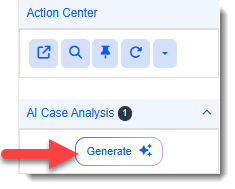
Added AI Case Analysis/Summary Generation Note: If you are interested in using this feature, please contact your ClientSpace Professional Services representative or submit an extranet case. You can now generate a concise summary of a case by clicking the Generate button located in the AI Case Analysis panel in the Action Center of a Client Service Case.
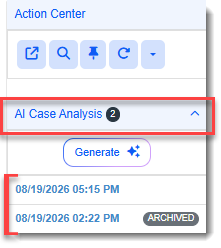
The system automatically gathers relevant case details, notes, and activities to produce an AI-driven analysis, including a priority assessment and recommended next steps. Once an AI analysis is generated, it is saved as a child record which is accessed from the case record by clicking the AI Case Analysis link. This expands the list of links to all AI Case Analysis forms associated with the case. The links are ordered by date and time created with the most recent on top. Older AI Case Analysis forms are marked "Archived" as shown in the example list below:
Note:
See: |
| 78772 |
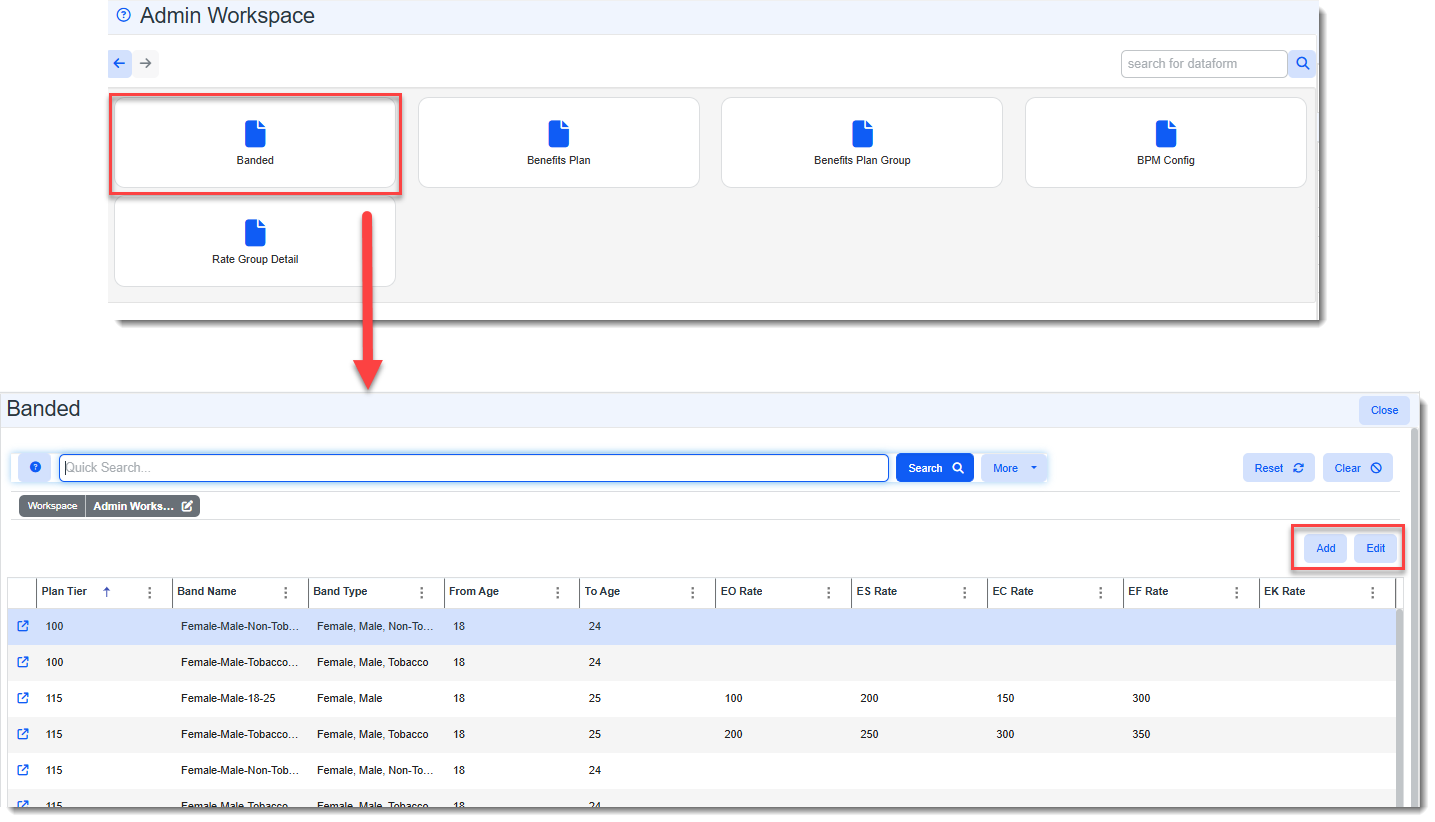
Added Banded Dashboard and Access to Banded Dataform from Admin Workspace The Banded dashboard, listing all age band records and access to Add or view and Edit age band records, is now available from the Benefits dataform category tile of the Admin Workspace.
This allows Benefits Administrators to manage age band records from the Admin Workspace.
Also see:
|
 >
> 

Advanced Administration and System Administration
|
Case |
Enhancement |
|---|---|
|
64972 |
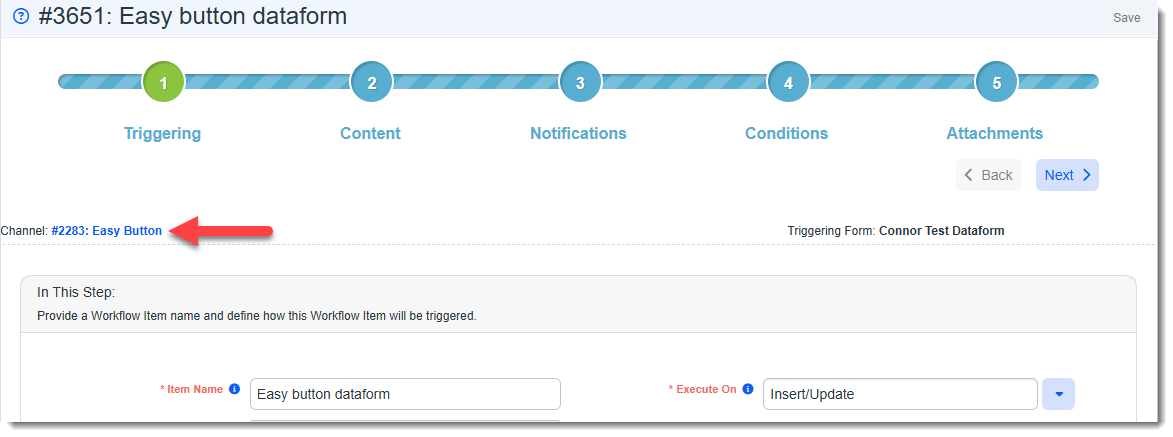
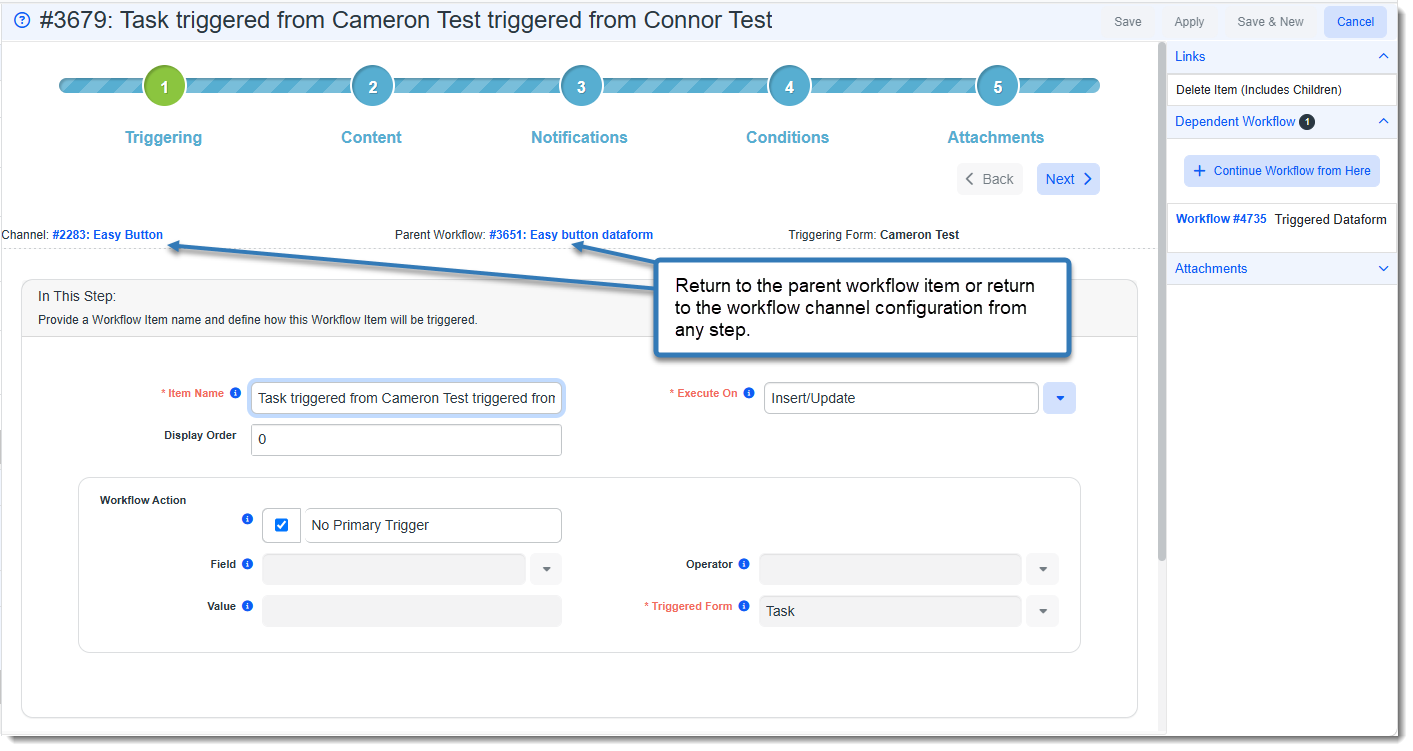
Added Links from Workflow Channel Items To Parent Workflows Global Administrators can now quickly navigate to the parent channel configuration level of a workflow item via a new "Channel #: Channel Name" link, visible at every step of a saved workflow item.
Clicking the link opens the workflow channel configuration page and displays it as a new work item in the Work Center for streamlined troubleshooting and direct access to workflow channel configuration. Link placement is uniform at the top left of each step for consistency. For all dependent workflow items, a "Parent Workflow #: Workflow Item Name" link is also displayed. As you navigate through multiple levels of dependent workflow items, each item displays a link to its immediate parent workflow item as well as to the main channel configuration level via the "Channel #: Channel Name" link. Link placement is uniform at the top center of each step for consistency.
|
|
69994 |
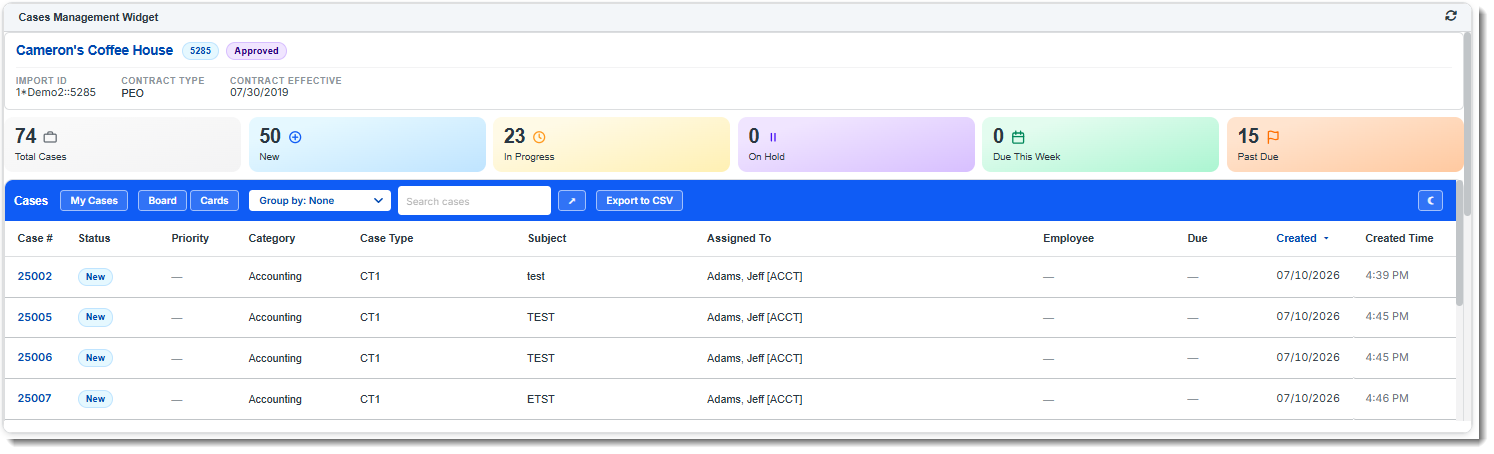
Added Cases Management XSLT Configuration for Use With the Query Widget A new Cases.xslt file and peo_xslt_case stored procedure have been added which will allow Global Administrators to set up a Query (XSLT) widget as a powerful Cases Management dashboard.
The solution is intended to be anchored to workspace landing pages. Note:
See: Also see:
|
|
74730 |
Updated Initial Import Form Management Initial import form management has been improved. Initial Import forms are accessed in the Admin Workspace or from System Admin
See: |
|
76060 |
Added Master Survey Recipients Dashboard and Detail Page Administrators can now view and manage survey recipient "Unsubscribe" statuses through a new Master Survey Recipients dashboard (System Admin |
|
77095 |
Improved Searching on the Widget Layouts Dashboard The following improvements have been made to the Widget Layouts dashboard (System Admin
|
|
77545 |
Added SurveyURL Replace Field to Support Sending Survey Links in AI-Assisted Email Template Body Text SurveyURL is now an available replace field when you click the See Replace Fields link on the Email Template Step 2: Content tab. This allows you to include survey links on AI-assisted content. |
| 78435, 78438 |
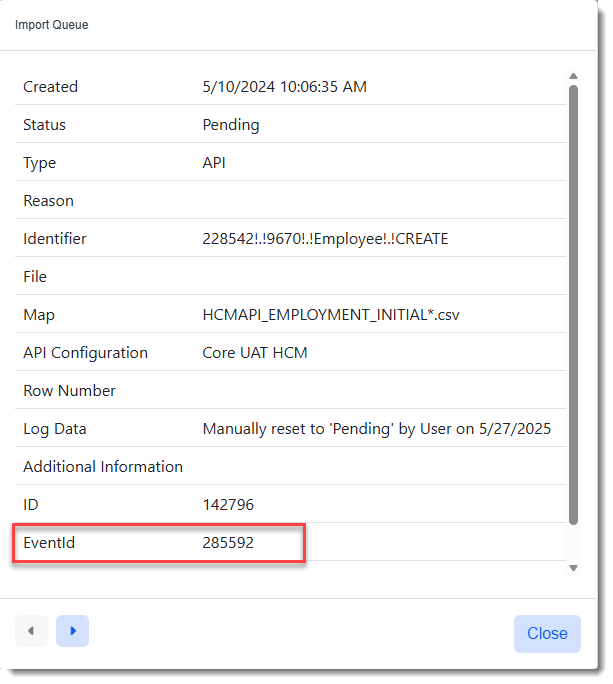
Added Event ID to Import Queue Records The Import Queue Record now includes an Event ID field that maps directly from the PrismHR API event payload.
The Event ID can also be added as a column on the Manager Import Queue dashboard (System Admin |
| 78461 |
Added Link to User Profile in User Info Popup Window Global administrators can now access a user's profile directly from the User Info popup window (which displays when you click the User
Note: Only developer users can see other developer users. |
 icon next to a user field). Click the user's hyperlinked name to display the user profile record.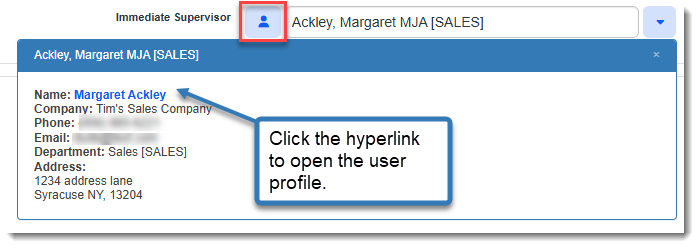
General User Enhancements
|
Case |
Enhancement |
|---|---|
|
78378 |
Added "Download All" Ability for Attachments Panel You can now download all files simultaneously within the Action Center Attachments panel of the following locations by clicking the Download All Attachments
This functionality zips all associated attachments into a single zip folder for easier management and retrieval from your Windows Downloads folder. Note:
|
| 78421 |
Added Email File Preview Support You can now preview .EML email file attachments directly within the Document Previewer without needing to download them. This update allows for a quick summary of the email's subject and body text and also displays a list of any file attachments associated with the email. |
|
78864 |
Improved Global Search Focus Behavior Previously, under certain conditions, the Global Search field could remain in its compact state instead of expanding to the full-size search field. For example, this could occur if you entered a character in the search field, clicked elsewhere in ClientSpace, and then returned to the search field. Now, when you return to the search field, the full Global Search field automatically opens and preserves any text entered in the compact search field. |
|
79008 |
Updated Report Center Widget Link Behavior The Open Report button on Business Intelligence widgets now correctly directs users to the specific report workbook in Report Center instead of going to the Report Center Home page. |
 icon:
icon: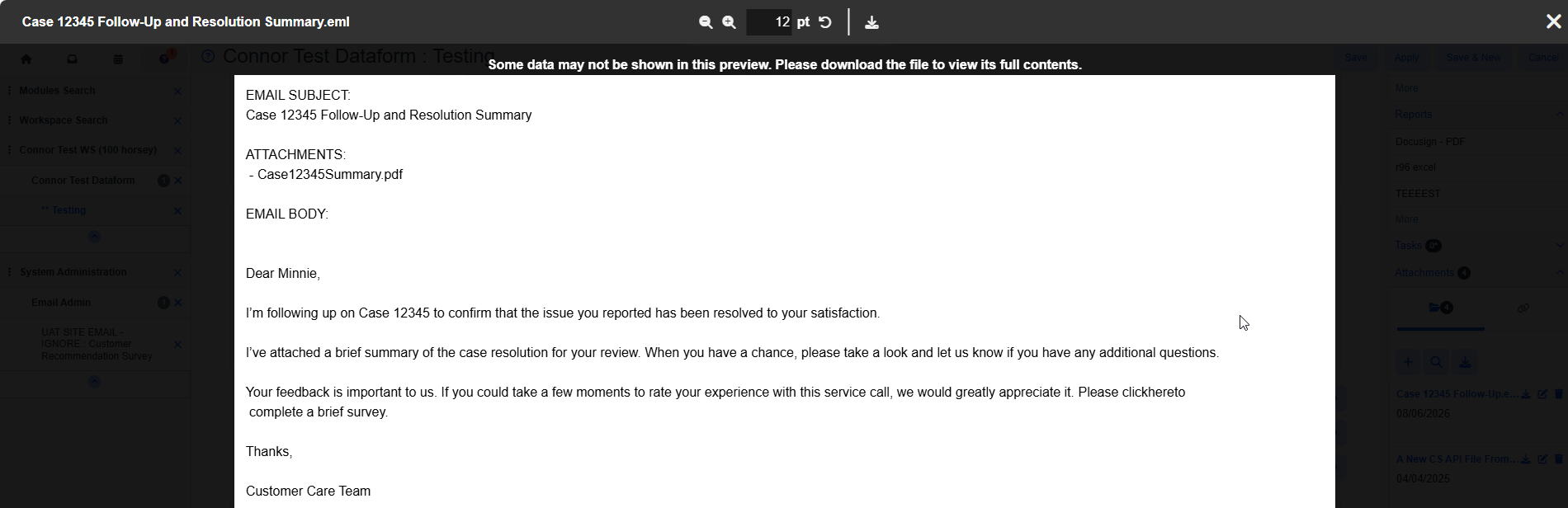
Fixes
|
Case |
Issue summary |
Resolution |
|---|---|---|
| 78926 |
Fixed Miscellaneous Invoice Export Issue |
Resolved an issue in the PrismHR Bill Records scheduled process where the employee last name was not exporting correctly for miscellaneous invoices. The export now correctly iterates through and includes the accurate last name for each employee record. |