R160 Sprint: 1/2/2026 to 2/3/2025. To learn about product features that you may not recognize, contact ClientSpace Professional Services.
Release Schedule
Release updates are implemented by the group, as indicated in the following table.
The release schedule is subject to change and updated as required. To determine your group or ask questions, please log a case for ClientSpace Professional Services.
|
Sprint 1/2/2026 to 2/3/2026 |
||
|---|---|---|
|
Upgrade groups |
Date of upgrade |
Tentatively occurs on |
| Group 1 | Second Tuesday of the month | February 10, 2026 |
| Group 2 | Third Tuesday of the month | February 17, 2026 |
| Group 3 | Fourth Tuesday of the month | February 24, 2026 |
Enhancements
Enhancement groups are Change in Functionality, ClientSpace Premium (ClientSpace with additional modules), Advanced Administration, General, and Staffing.
ClientSpace Premium
ClientSpace API
|
Case |
Enhancement |
|---|---|
| 73199 |
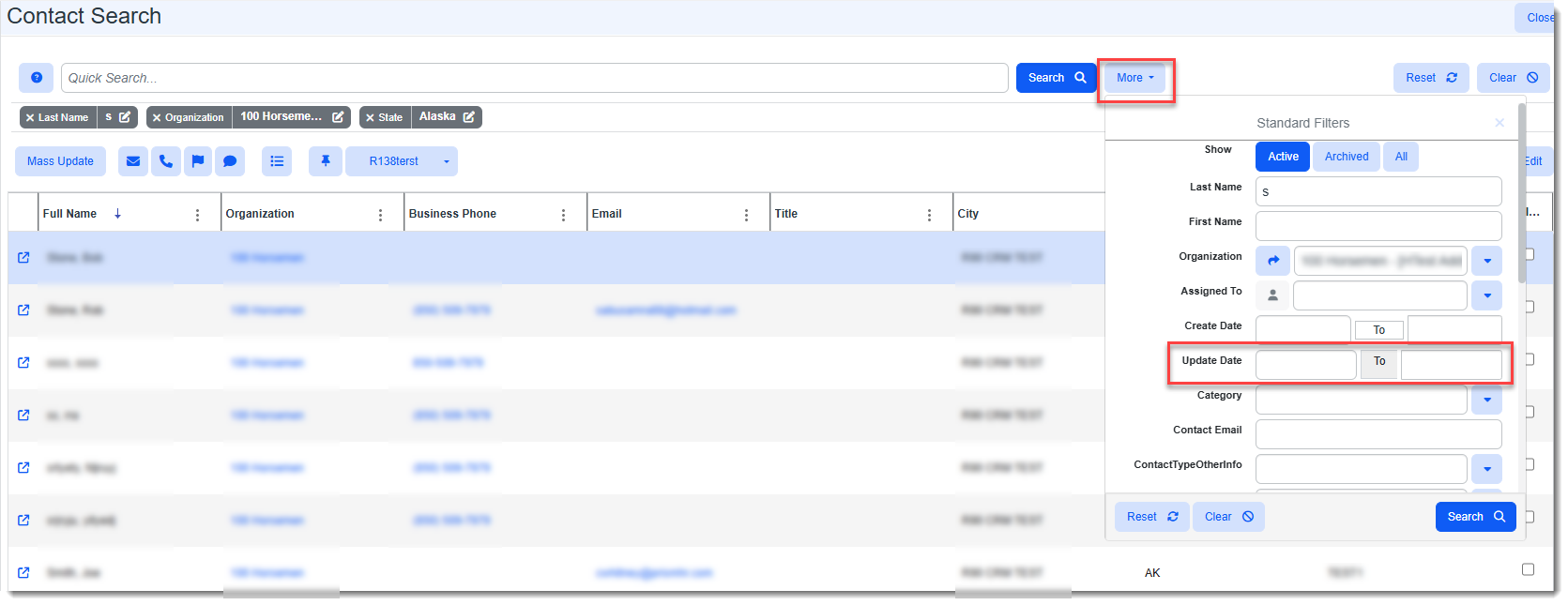
Added Date Parameters to GET /api/contact/v3.0/search Method of ClientSpace API and to Contact Search Dashboard The following query date parameters have been added to the GET /api/contact/v3.0/search method parameters to allow searching contacts for a specified date range:
Note:
|
Benefit Plan Manager (BPM)
|
Case |
Enhancement |
|---|---|
|
75659 |
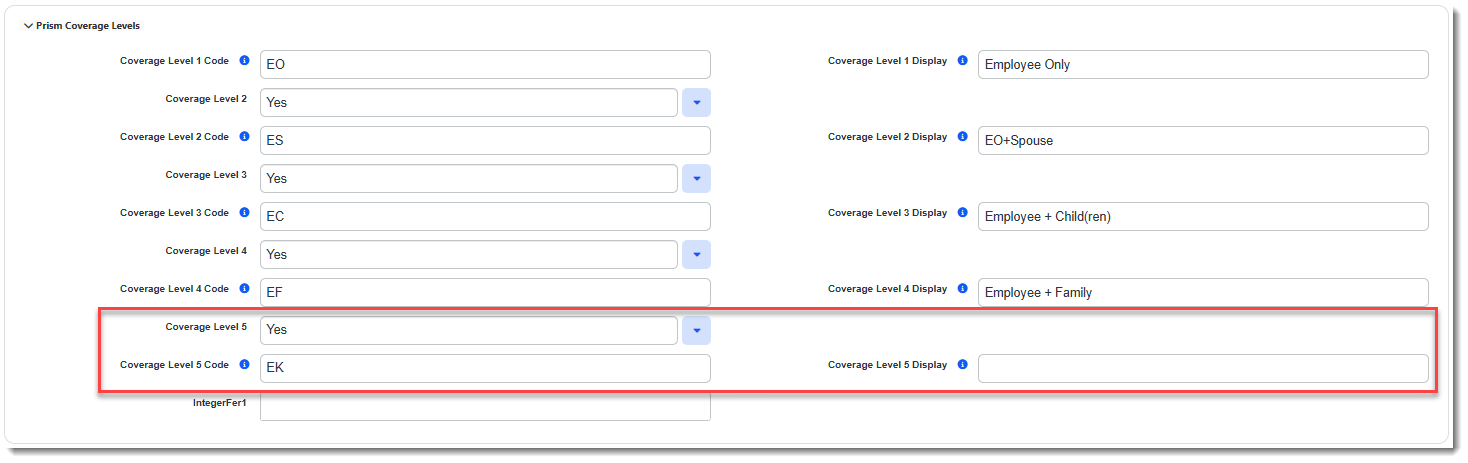
Domestic Partner (EK) Coverage Level Now Displays in BPM Previously, when Coverage Level 5 for Domestic Partner (EK) was added to a Benefit Plan in ClientSpace, it did not display in BPM. Now, Coverage Level 5 displays in BPM. Note: If you set the Coverage Level 5 field to Yes on the Benefit Plan to display it without entering display label text in the Coverage Level 5 Display field (as shown in the image below), the default display text in BPM will be "Domestic Partner".
SeeConfiguring the Benefits Plan Prism Coverage Levels Fieldset. |
|
75119, 76287 |
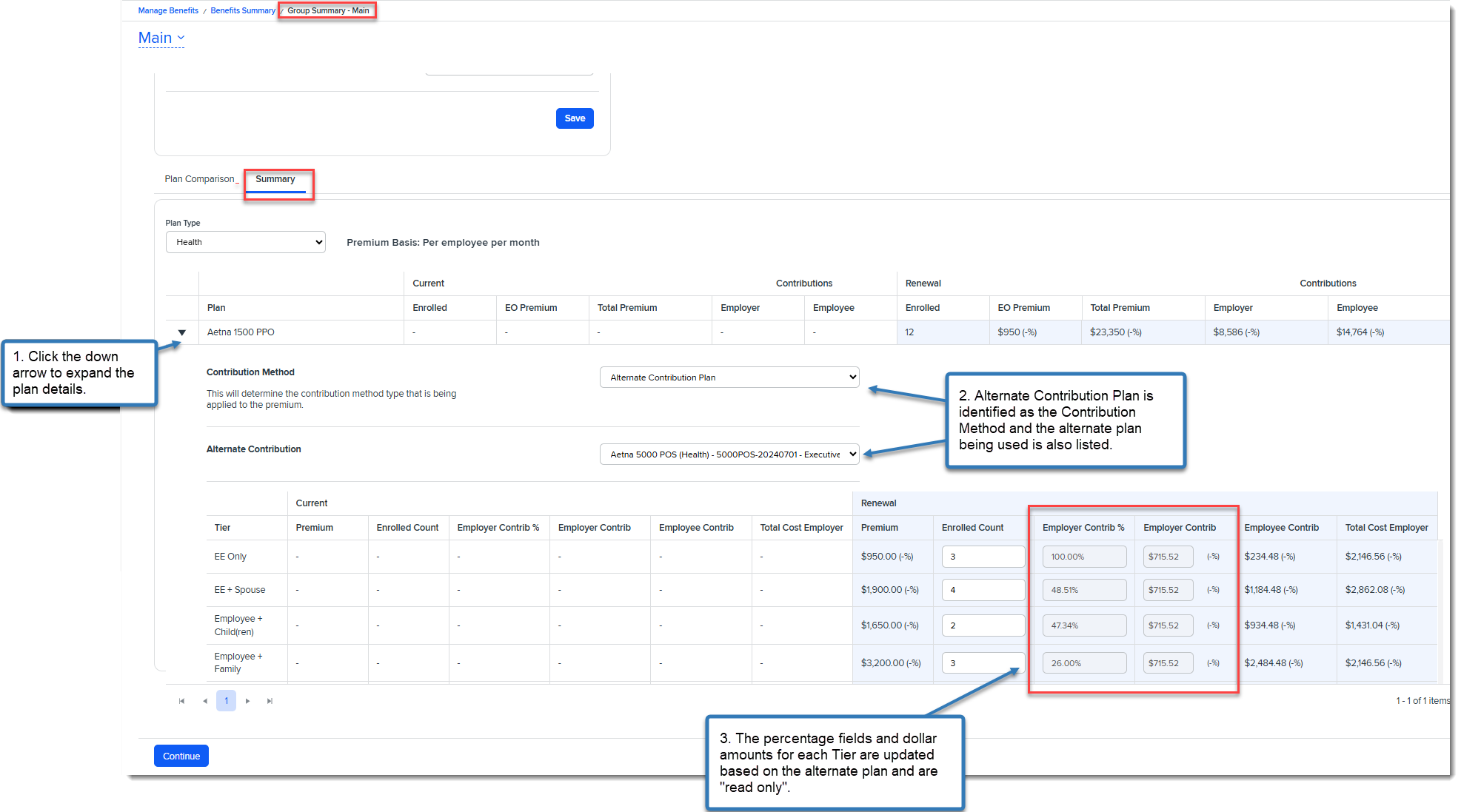
Added Support for New "Alternate Contribution Plan" Contribution Method in BPM Support for the new Alternate Contribution Plan Employer Contribution Method has been added to BPM. When this option is selected for a plan in ClientSpace, all of the Employer Contrib% and Employer Contrib Coverage Level (i.e., Tier) percentage fields and dollar amounts are also updated in BPM on the Group Summary > Summary tab and flagged as "read only".
See related Case# 73552 for additional details. |
| 75749 |
"Cafeteria Plan" Contribution Method is Now Only Shown when "Cafe Eligible" is Selected Previously, when the Cafe Eligible checkbox on the Offered Benefits Plan (OBP) dataform was not selected, the Cafeteria Plan option was still shown in the Contribution Method drop-down list on the ClientSpace OBP and on the Benefit Plan Manager (BPM) Group Summary > Summary tab in the Contribution Method drop-down list. Now, if the Cafe Eligible checkbox on the OBP is not checked, the Cafeteria Plan Contribution Method option does not display on the OBP or in BPM. |
|
75938 |
Changed "Client Renewal Notes" Field to an Editor Field Previously, the Client Renewal Notes field in BPM on the Selection Summary/Signature page was a TextArea field datatype that could not support the display of advanced text formatting, hyperlinks or images while the Client Renewal Notes field in ClientSpace on the Benefits Batch dataform is an Editor field datatype that does support advanced formatting. Because of the datatype difference, if the Client Renewal Notes entered in ClientSpace contained any advanced formatting, it could not be displayed in BPM. Now, the Client Renewal Notes field in BPM is an Editor field datatype that displays advanced formatting from ClientSpace in BPM as shown in the example below:
See: |

Other ClientSpace Premium
|
Case |
Enhancement |
||||||||||||||
|---|---|---|---|---|---|---|---|---|---|---|---|---|---|---|---|
|
71554 |
Added Business Rule and Metadata to Automatically Set OBP Employer Contributions for Company Paid and Voluntary Plans A new business rule named Default Company Paid And Voluntary Employer Contrib has been added. This rule evaluates metadata stored on the Benefit Plan Category lookup detail records in the Payment Responsibility field and then updates the Contribution Method percentage and amount fields in the Employer Contributions (%) fieldset of the affected Offered Benefit Plans(OBPs) for all available coverage levels.
Note:
To support this enhancement, the following changes have been made:
See Configuring the Benefit Plan Category Payment Responsibility and Business Rule Methods. |
||||||||||||||
|
73552 |
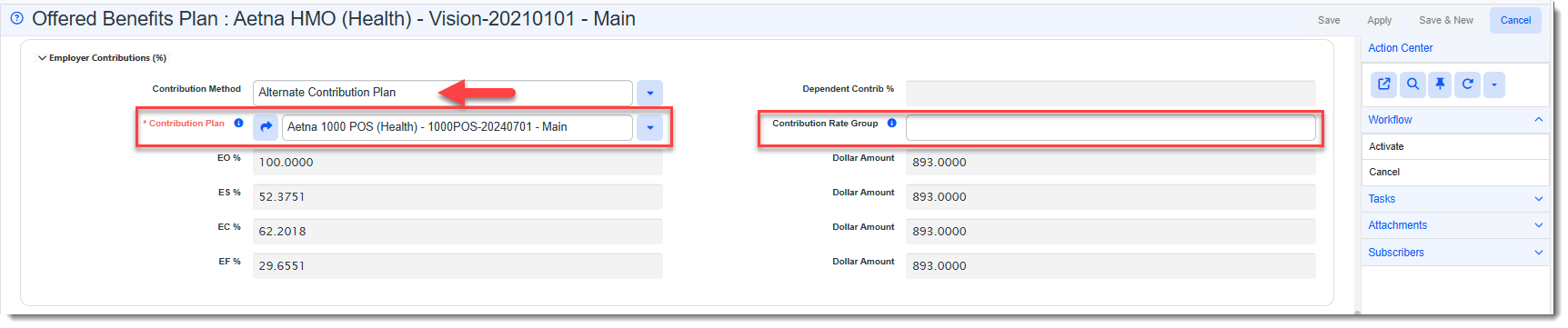
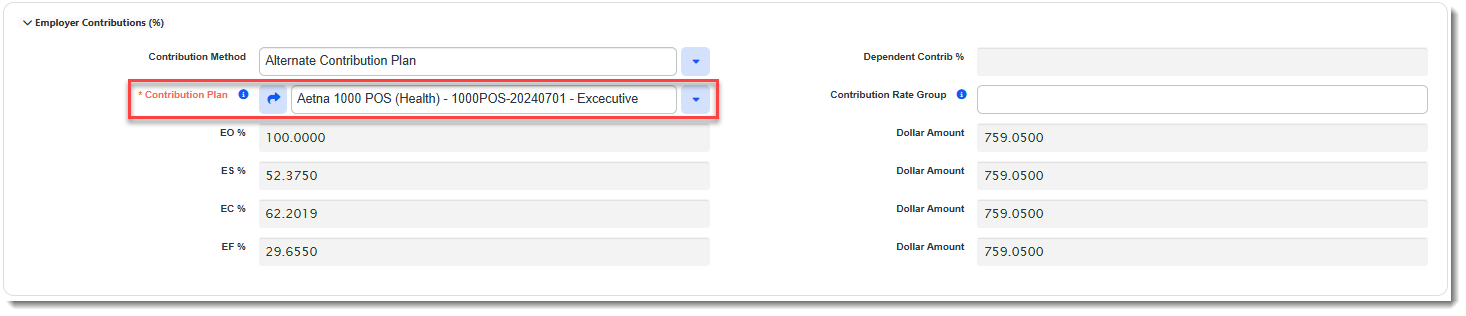
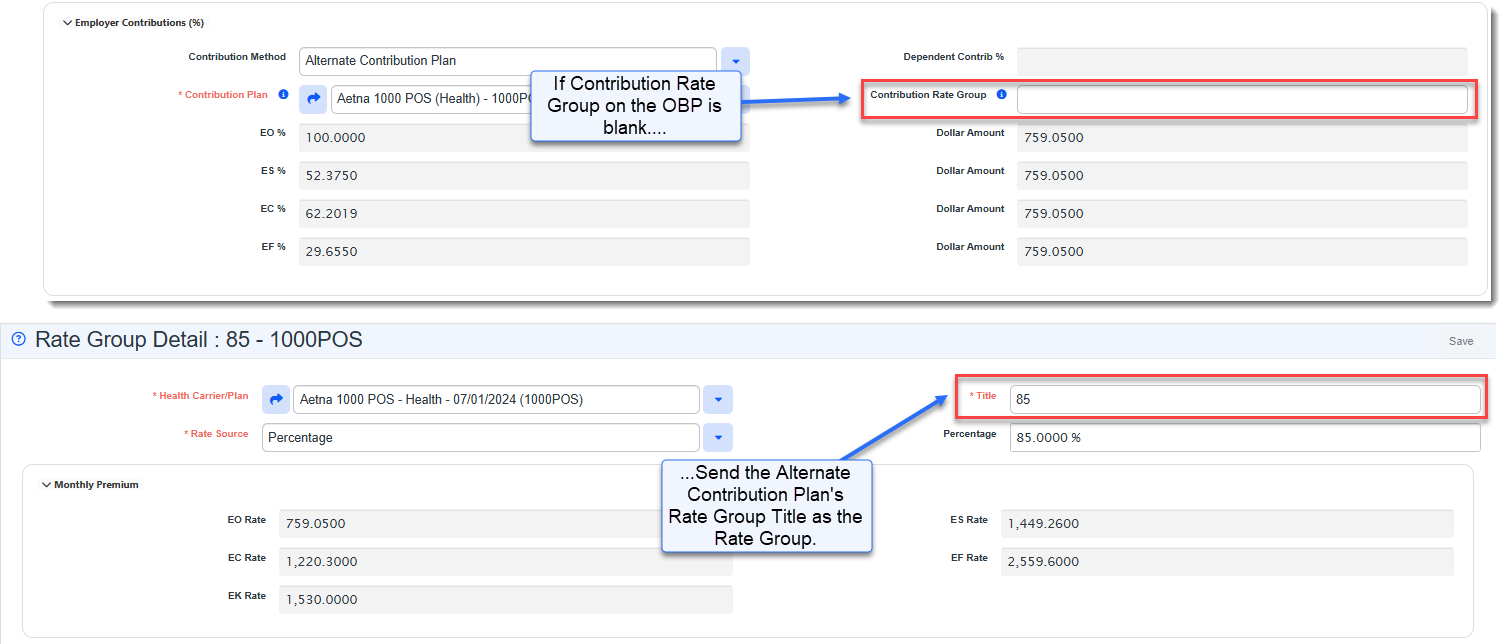
Added Ability to Set Employer Contributions Using an Alternate Base Plan Existing PrismHR functionality allows you to set employer contributions on a renewal Offered Benefit Plan (OBP) using an alternate base plan instead of the parent plan associated with the OBP. Now, this same functionality has been added to ClientSpace.
The following changes were made to support this feature:
See Setting Employer Contributions. Also see related Case #74814. |
||||||||||||||
|
74814 |
Updated Benefit Billing Rules Export to Support "Alternate Contribution Plan" The Benefit Billing Rules Export has been updated to support exporting Alternate Contribution Plan details to PrismHR. When the Contribution Method on a ClientSpace Offered Benefit Plan (OBP) dataform is set to Alternate Contribution Plan and the alternate plan is identified in the Contribution Plan field, when the Billing Rules Export link is clicked on the related Benefits Batch, the following occurs:
See Setting Employer Contributions. Also see related Case #73552. |
||||||||||||||
|
74815 |
Updated Benefit Rules Export Merge to Include Alternate Contribution Plan Columns The Benefit Rules Export merge has been updated to support the changes made in related Case# 73552 to allow you to set an "Alternate Contribution Plan" as the employer contribution method. Two new columns have been added to the Benefit Rules Export Merge on the CSExport tab:
|
||||||||||||||
|
74940 |
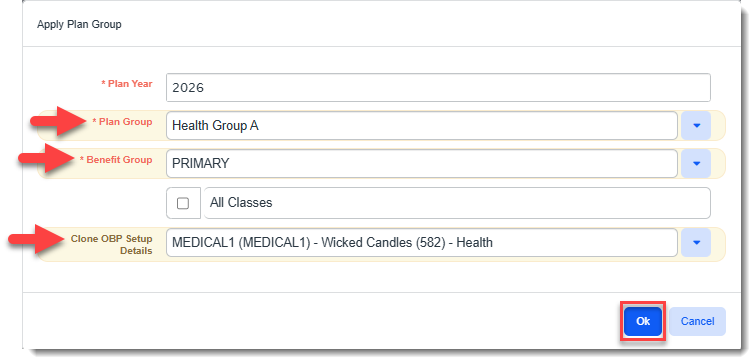
Added Ability to Clone Plan Setup Details Using "Apply Plan Group" Function The existing "Apply Plan Group" function has been enhanced to allow you to clone Offered Benefit Plan (OBP) fields located in the Setup Details fieldset from an existing OBP to all of the OBPs within the Plan Group and Benefit Group (or all benefit groups if you select All Classes) specified on the Apply Plan Group form. To support this feature, a new field named Clone OPB Setup Details was added to the Apply Plan Group form. This is where you specify the "clone from" OPB.
Note:
|
||||||||||||||
| 75799 |
Updated OBP Import "Update Contributions" Logic Previously, when using the OBP Import process to import Offered Benefit Plans (OBPs) from PrismHR, selecting the Update Contributions option resulted in ClientSpace setting the Employer Contributions Contribution Method field to "Manually Set Dollars" and then updating the Dollar Amount field for each coverage level (i.e., EO/EE, ES, EC, EF/FAM, or EK) where a match could be made to a corresponding PrismHR coverage level.
Now, this process has been enhanced as follows to update contributions based on the PrismHR Insurance Class instead of always applying "Manually Set Dollars".
For PrismHR insurance classes M (Medical), N (Dental), or V (Vision), the following conditional logic is used:
For PrismHR insurance classes L (Life), B (Bond), D (Long-Term Disability), S (Short-Term Disability or O (Other) the following conditional logic is used:
|
 >
> 
Advanced Administration and System Administration
|
Case |
Enhancement |
|---|---|
|
69987 |
Added Manager Field to Employment Form and Updated the PrismHR Import API to Import Manager Data A Manager field has been added to the Employment Information fieldset of the Employment dataform (which is accessed by clicking the Employee Info link on the Employee dataform). The Manager field is populated by the PrismHR Initial or Ongoing Import API. It cannot be entered manually. The field establishes the connection between the manager and a manager's direct reports so that ClientSpace can obtain the manager's email address for use in email template notifications. You can click the the Jump to Related Form
Examples of how this could be used:
Note:
Also see related Case# 76489 which details the server data procedure changes made to support adding the manager to email templates as an email recipient. |
| 70266 |
Added "Benefit Parent Company" to Client Master and PrismHR API Import Mapping A new field named Benefit Parent Company has been added to the Client Master dataform in the Additional Company Info section. The field is populated with the PrismHR Client ID (after it is translated into a Company Name) by the PrismHR API. Field mapping has been configured in the PrismHR API Company Initial and Ongoing Import Mapping to support this change. Note: Multi-tenancy is supported using the PEOID of the Client Master. |
|
72570 |
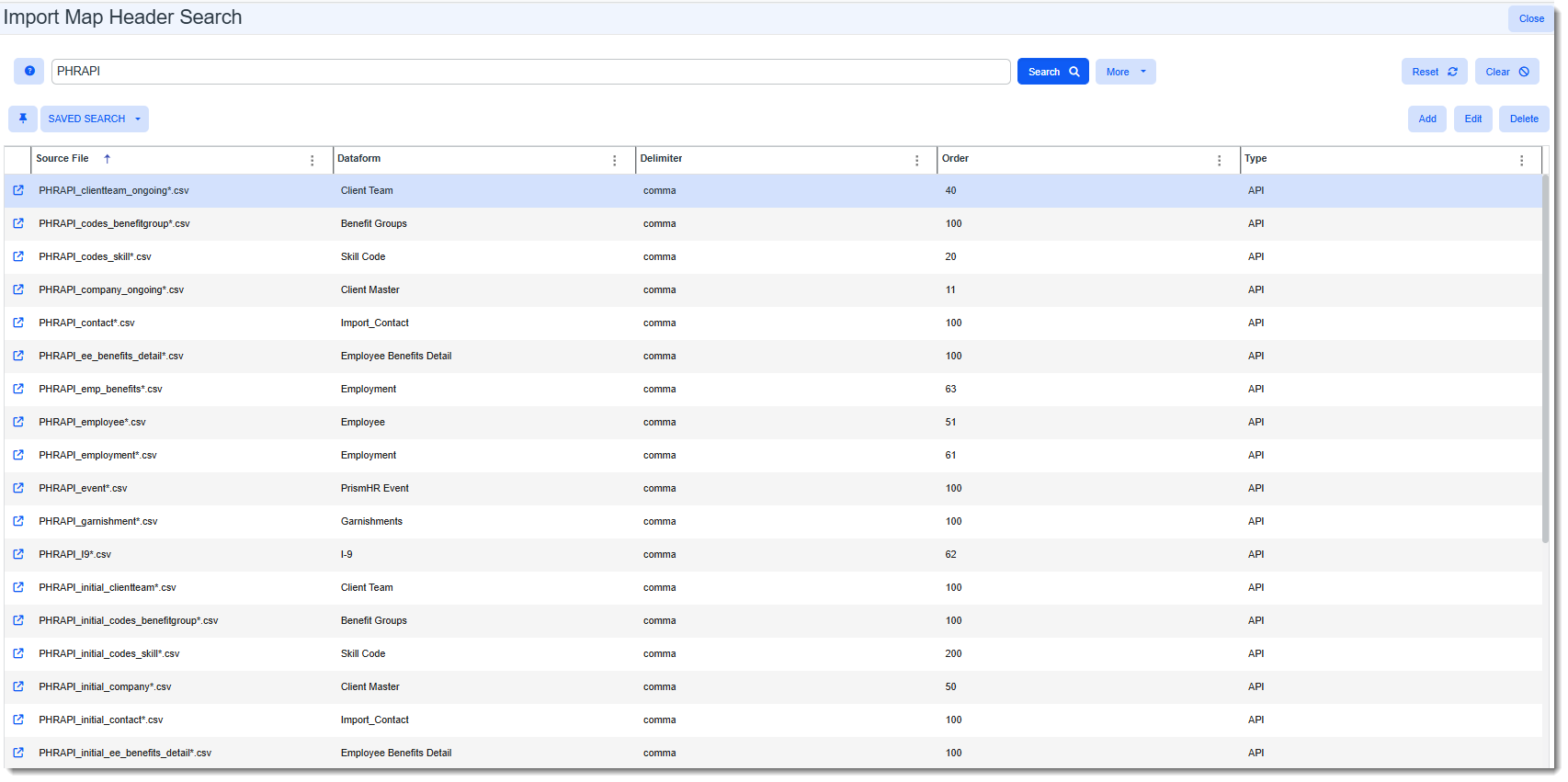
Updated PrismHR Import Map Headers to "PHR" instead of "HRP" PrismHR import map header source file names are now prefaced by "PHR" instead of "HRP" (System Admin
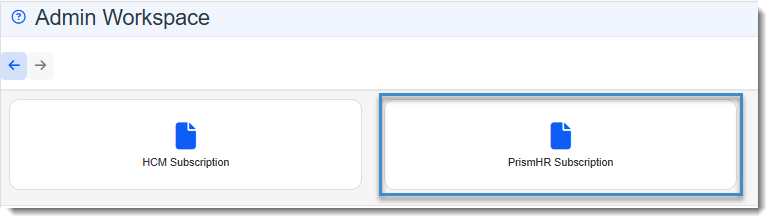
This was done to make the import map headers more easily recognizable as PrismHR import configuration files and reduce the potential for the files being mistaken for HCM import map headers. Additionally, the Admin Workspace HRP Subscription tile was also renamed to PrismHR Subscription:
Note: Numerous ClientSpace Help Center articles were updated to reflect these changes. The list below reflects the most affected articles, but is not an exhaustive list. See: |
|
76376 76024 |
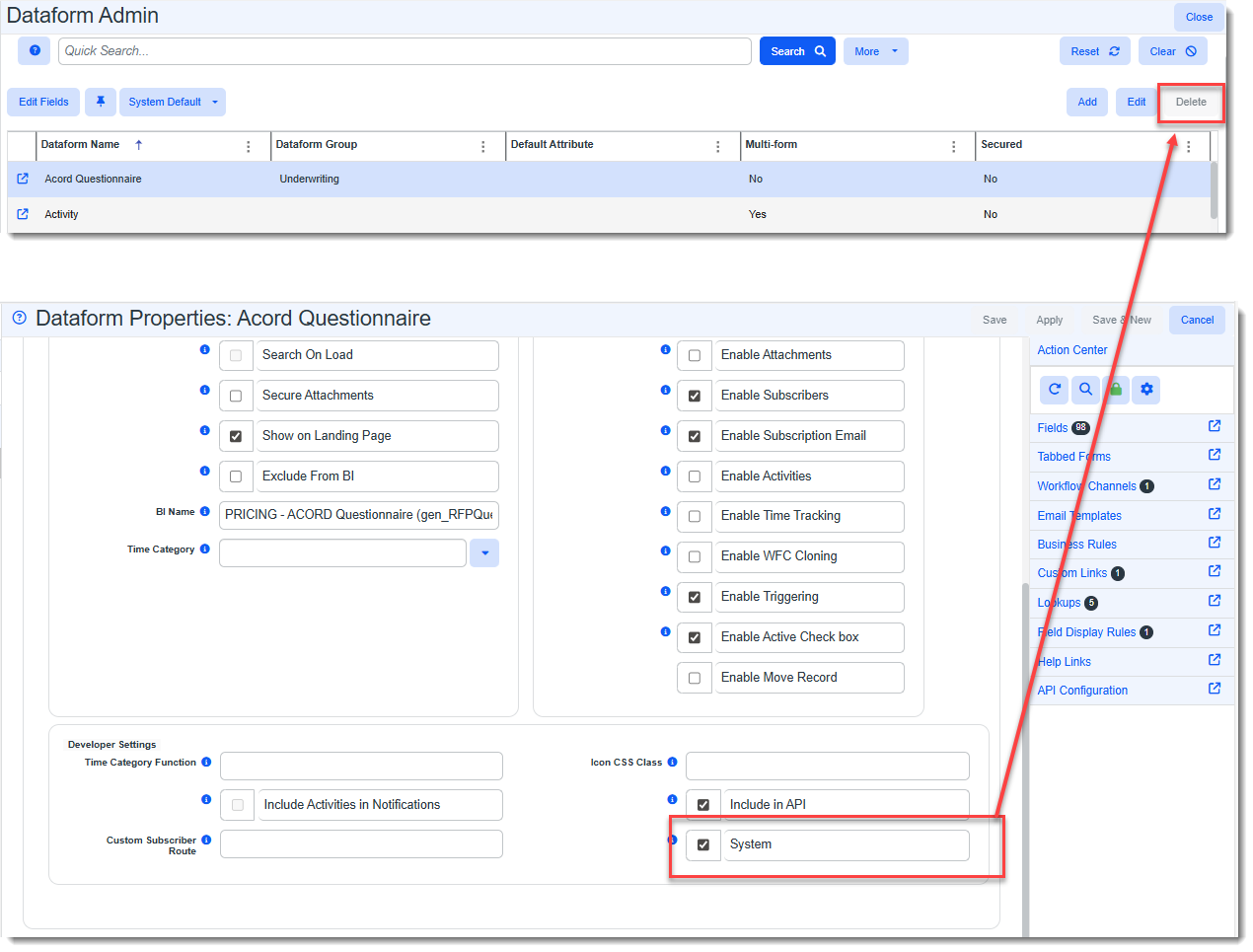
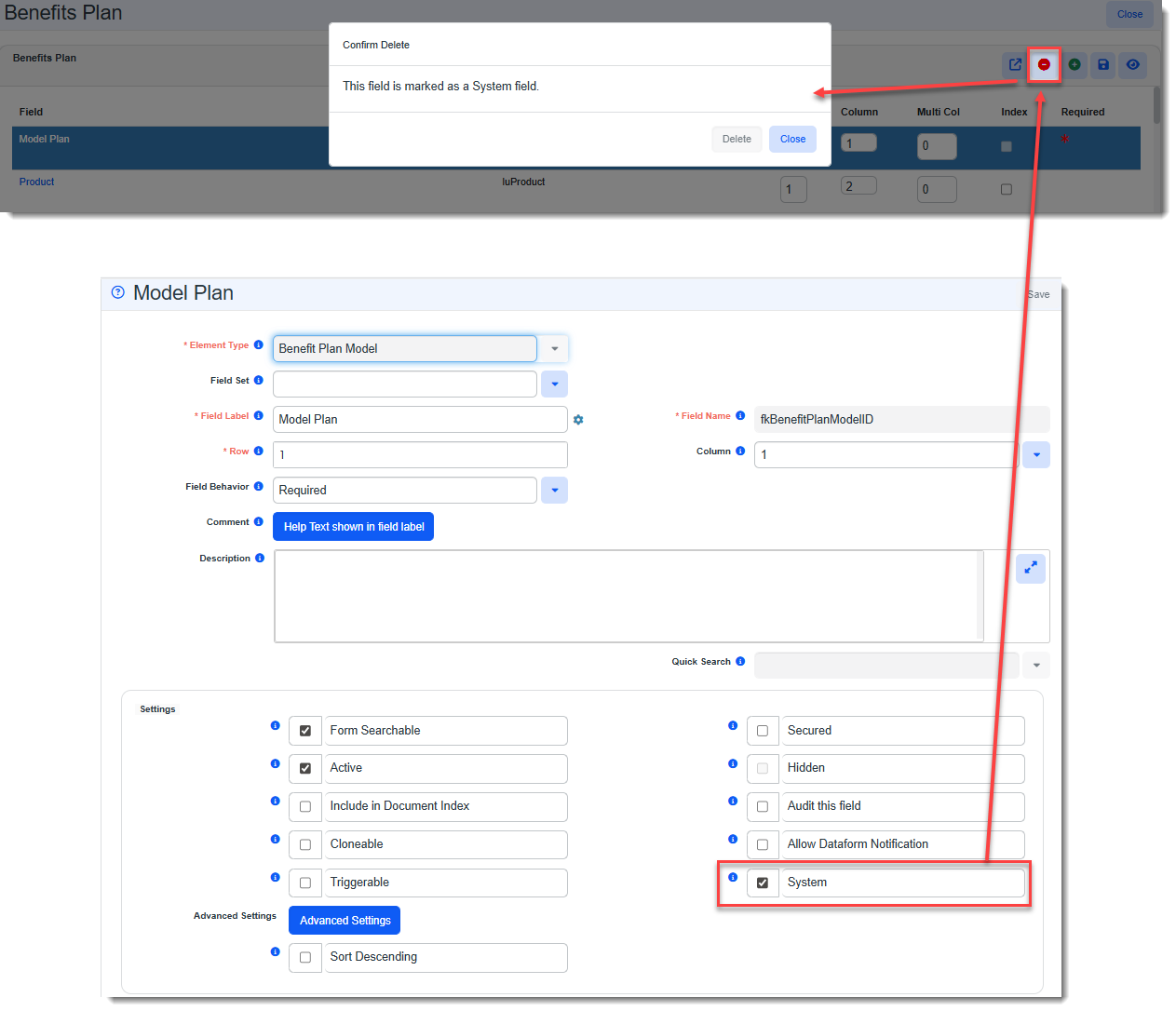
Set CORE and PEO Non-Custom Fields and Tables to "System" With this update, all CORE and PEO fields and forms/tables that are not custom fields and forms are flagged as System fields and forms. This prevents them from being deleted by both Developer users and Global Administrators. Note: Developer users can disable the System flag on fields and forms. Once the System flag is disabled, a Global Admin or Developer user can then delete the affected field or form. This added control offers an additional layer of protection against accidental and unauthorized deletions.
When the System flag is enabled for a dataform in the Dataform Properties, and you select the dataform on the Dataform Admin dashboard, the Delete button on the toolbar is dimmed and disabled:
When the System flag is enabled for a field in the Dataform Field Properties, if you are a Global Administrator, the Delete button is gray and inactive. If you are a Developer user, you can still click the Delete button on a field in the field properties grid for the form, but the following message displays: "This field is marked as a System field.":
Note:
See: |
|
75462 |
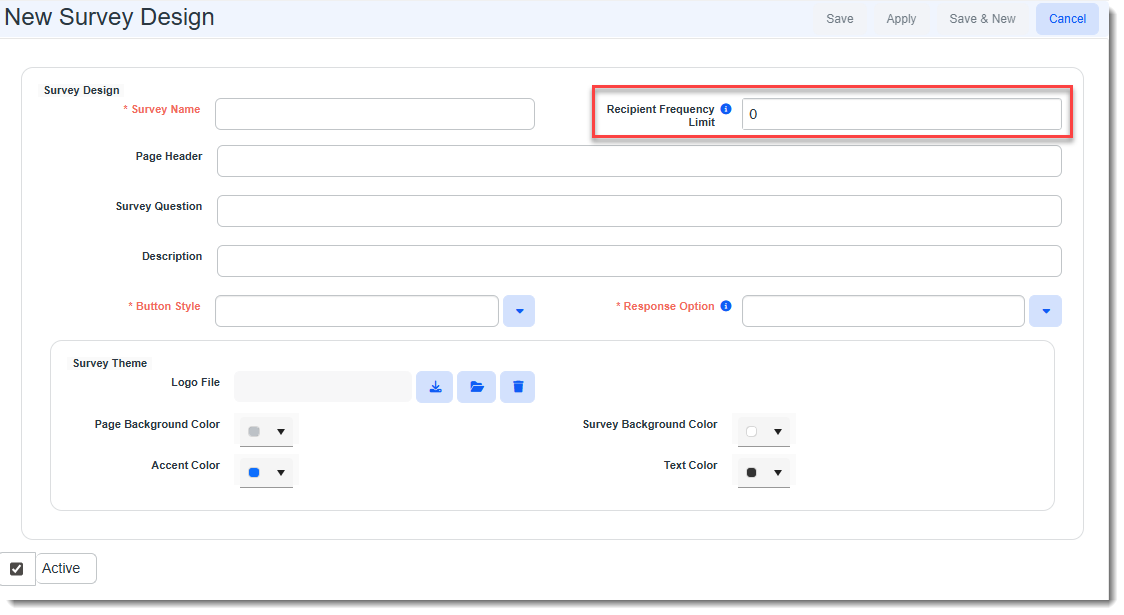
Added Recipient Frequency Limit Setting to Survey Design Form A Recipient Frequency Limit field has been added to the Survey Design form.
The value in the field defaults to 0 and represents the number of days between the date the survey was last sent and the current date that must pass before the survey can be sent to a recipient again.
Note: This functionality respects "unsubscribe" functionality and any other email template configuration such as the Only Trigger Once setting in the Email Template configuration. |
|
75819 |
Removed Constraint that Only Allowed a Survey to Be Triggered Once per Single Form to an Email Recipient Previously, there was a built-in constraint that only allowed a survey email template to trigger once to a target email recipient from the triggering single form. Now, the built-in constraint has been removed which allows the survey to trigger for the same recipient(s) each time the template conditions are met. You can still set a triggering constraint if desired by setting the Only Trigger Once checkbox in the survey email template configuration (System Admin IMPORTANT: With this update, please review all existing Real Time and Scheduled survey email templates to ensure that the Only Trigger Once flag is set on any surveys that should not trigger more than once per triggering form for the same recipients. |
| 75989 |
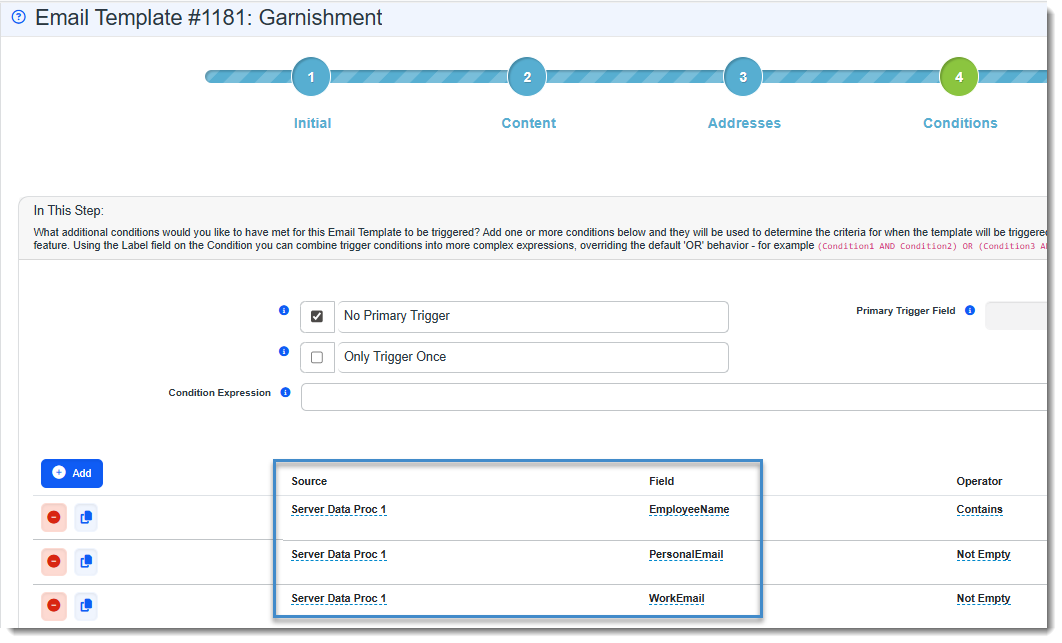
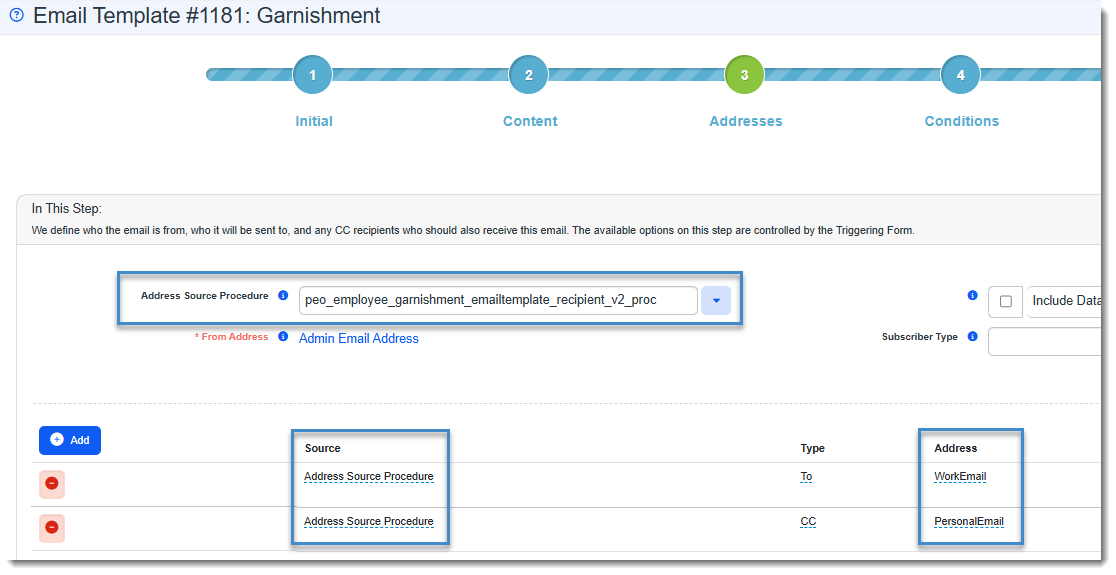
Added Garnishments Server Data Procedures to Retrieve Garnished Employee Name and & Email Addresses Two new server data procedures have been added to ClientSpace to facilitate retrieving the garnished employee's name, work and personal email addresses from the Employee record associated with their Garnishment record(s) for use on email templates:
|
| 76489 |
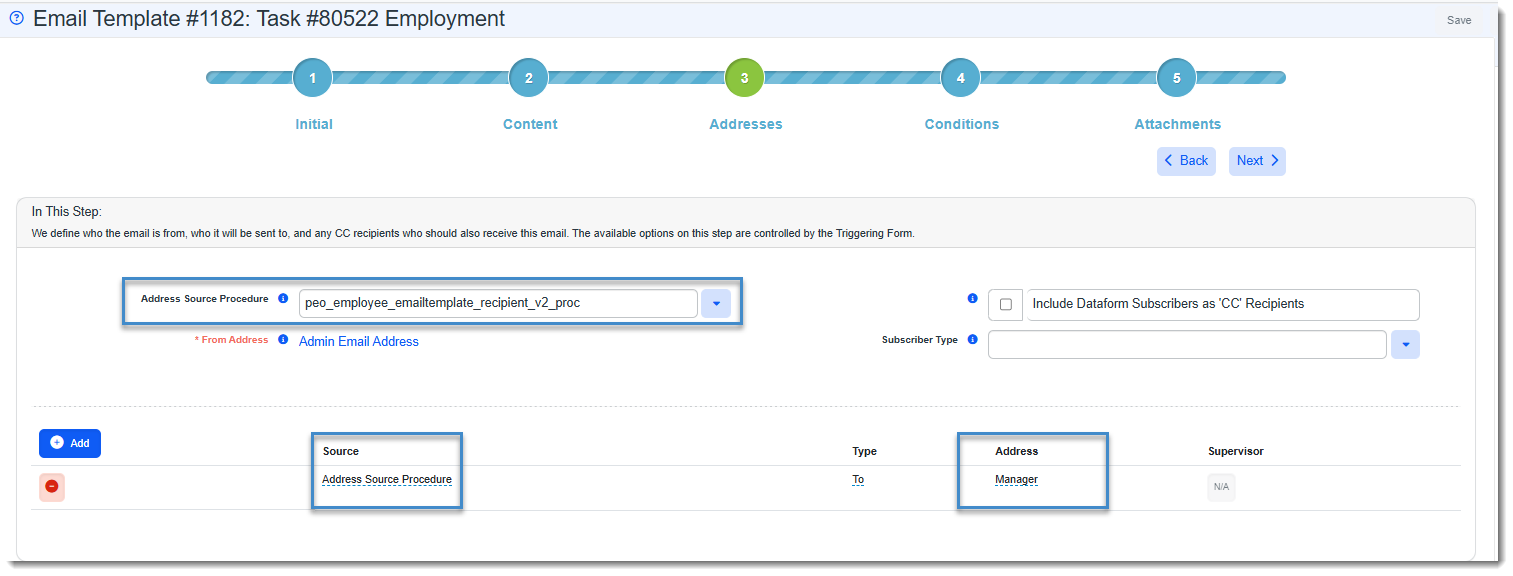
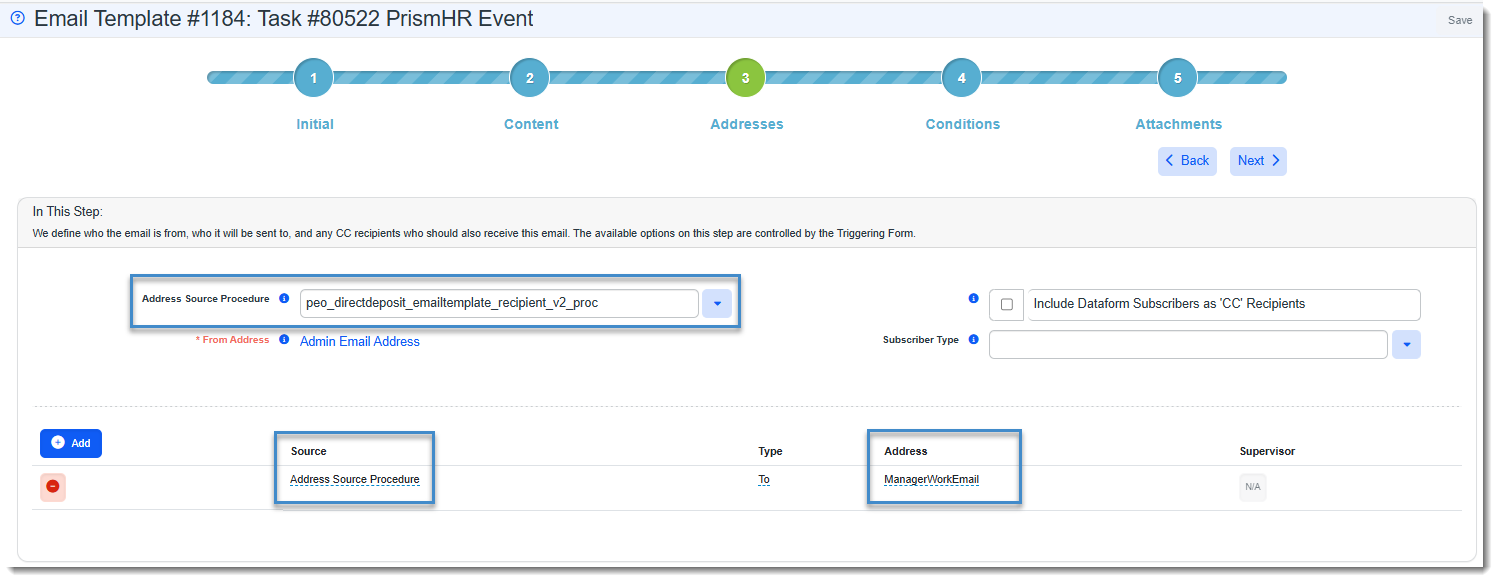
Modified Existing Server Data Procedures to Retrieve Employee Manager Email Address Two new server data procedures have been added to ClientSpace for use on email templates to connect the Manager field on the Employment form to the Manager's email address on the Employee form and facilitate retrieving their email address on email templates triggered by a direct report's Employee record, Employment record or PrismHR Direct Deposit Event record:
See: |
 button in the field to view the manager's Employee record:

 on Action Center toolbar) in the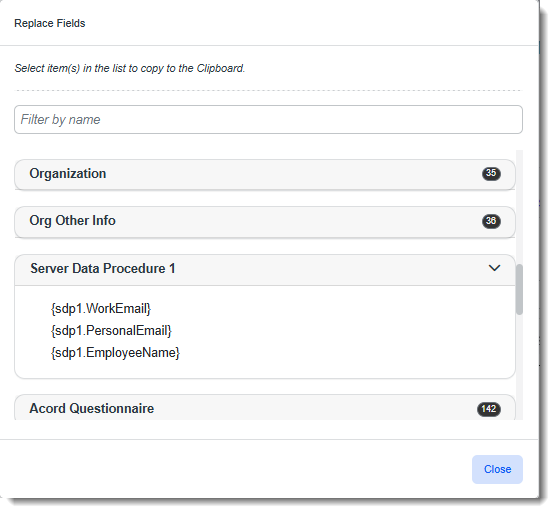
Fixes
|
Case |
Issue summary |
Resolution |
|---|---|---|
| 76410 |
PrismHR Ongoing Import: Benefit Groups Updated in PrismHR Were Not Updated in ClientSpace |
Previously, the PrismHR Ongoing Import stopped importing PrismHR Benefit Group updates into ClientSpace. This occurred due to a change in the PrismHR application to the Benefit Group subscription schema and class. To correct the issue, the ClientSpace Benefit Group subscription schema has now been updated to the new PrismHR schema of "Benefit" and the new class of "Groups". |