Configuring the Benefit Plan Category Payment Responsibility
On the Benefit Plan Category lookup detail form, there is a Payment Responsibility drop-down field. This is a metadata field which works with the Default Company Paid And Voluntary Employer Contrib business rule on the Offered Benefits Plan table. The rule evaluates the Payment Responsibility field values and then updates the Contribution Method percentage and amount fields in the Employer Contributions (%) fieldset of the affected Offered Benefit Plans (OBPs) for all available coverage levels as appropriate.
Note:
-
The rule is Active by default. The Payment Responsibility field of "out-of-the-box" lookup detail records that include the word "Company Paid" or "Voluntary" in the lookup Decode value are pre-configured for you. If there are custom lookups, you must update the Payment Responsibility field of the Benefit Plan Category lookup detail records (System Admin
 > Lookups) to trigger the rule.
 -
The rule will not overwrite existing contribution percentages. It will only set the percentages on blank or empty % fields, such as when the selected Contribution Method is "Manually Set Dollars" or "Manually Set Percentages".
This topic covers how to set the Payment Responsibility field value and describes the action taken when the Default Company Paid And Voluntary Employer Contrib business rule is triggered.
Pre-configured Lookups
The following Payment Responsibility field of "out-of-the-box" lookup detail records that include the word "Company Paid" or "Voluntary" in the lookup Decode value are pre-configured for you.
| Benefit Plan Category | Default Payment Responsibility Value |
|---|---|
| Life Insurance (Company Paid) | Employer Paid/Company Paid |
| Life Insurance (Voluntary) | Employee Paid/Voluntary |
| Long-Term Disability (Company Paid) | Employer Paid/Company Paid |
| Long-Term Disability (Voluntary) | Employee Paid/Voluntary |
| Short-Term Disability (Company Paid) | Employer Paid/Company Paid |
| Short-Term Disability (Voluntary) | Employee Paid/Voluntary |
Set the Payment Responsibility
To set the Payment Responsibility:
-
Go to System Admin
 > Lookups > Manage Groups. The Lookup Groups dashboard opens.
 -
Search for "Benefit Plan Category".
-
On the Lookup Group Details window, click Lookup Values.

The Lookups dashboard displays and is pre-filtered to the Group.
-
Open each record and assign a Payment Responsibility, making sure to Save your changes on each record.
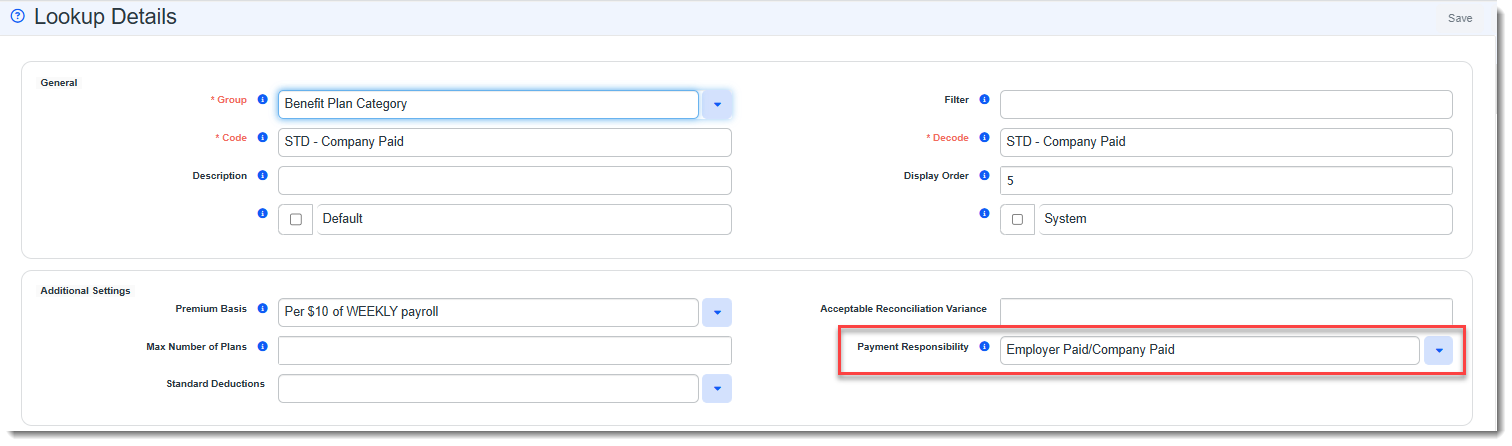
The following options are available:
- Employee Paid/Voluntary - When you set the Payment Responsibility field on a Benefits Plan Category Lookup to "Employee Paid/Voluntary" and save it, the Default Company Paid And Voluntary Employer Contrib business rule sets any empty Contribution Method amount and % fields to 0 for all available coverage levels.
-
Employer Paid/Company Paid - When you set the Payment Responsibility field on a Benefits Plan Category Lookup to "Employer Paid/Company Paid" and save it, the Default Company Paid And Voluntary Employer Contrib business rule sets any empty Contribution Method amount to the total premium amount for each coverage level and also sets the corresponding % fields to 100%.
-
Mixed - When you set the Payment Responsibility field on a Benefits Plan Category Lookup to "Mixed" and save it, no changes are made.