R159 Sprint: 12/1/2025 to 12/31/2025. To learn about product features that you may not recognize, contact ClientSpace Professional Services.
Release Schedule
Release updates are implemented by the group, as indicated in the following table.
The release schedule is subject to change and updated as required. To determine your group or ask questions, please log a case for ClientSpace Professional Services.
|
Sprint 12/1/2025 to 12/31/2025 |
||
|---|---|---|
|
Upgrade groups |
Date of upgrade |
Tentatively occurs on |
| Group 1 | First Tuesday of the month | January 13, 2026 |
| Group 2 | Second Tuesday of the month | January 20, 2026 |
| Group 3 | Third Tuesday of the month | January 27, 2026 |
Announcements
|
Summary |
Details |
|---|---|
| IMAP Deprecation: ClientSpace Email Integration Users |
Microsoft is no longer supporting the IMAP integration. Please move all Email Integrations to use Microsoft Graph API going forward. It is a supported, more secure authentication method. Switch to Graph API, in six easy steps:
If you require assistance, please contact your ClientSpace representative or log an extranet case. |
 >
>  button in the Action Center to re-authenticate.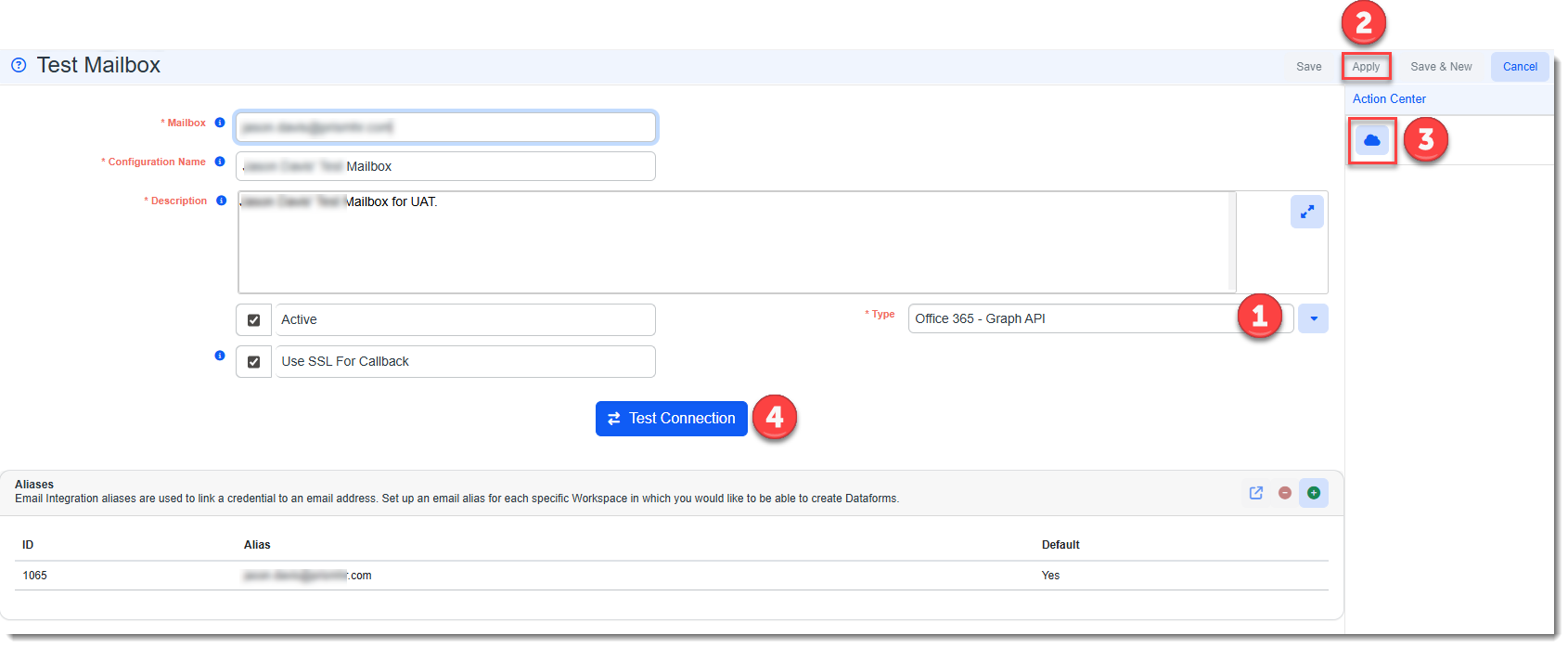
Enhancements
Enhancement groups are Change in Functionality, ClientSpace Premium (ClientSpace with additional modules), Advanced Administration, General, and Staffing.
ClientSpace Premium
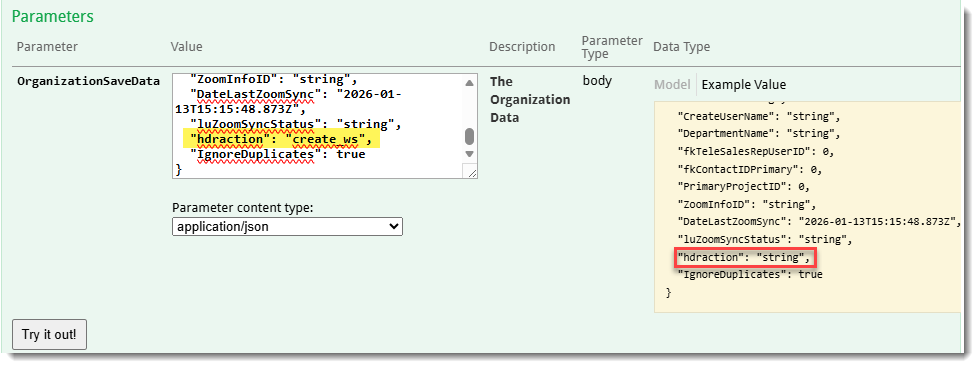
ClientSpace API
Benefit Plan Manager (BPM)
|
Case |
Enhancement |
|---|---|
|
75841 |
Improved BPM Batch Card Title Behavior The following changes have been made to the BPM Batch Title behavior in BPM:
See: |
| 75108 |
Improved Plan Filtering on Benefits Summary Previously, the Benefit Plan Manager (BPM) Benefits Summary tab "Filters" section contained an Include New Plans drop-down field which defaulted to No. When set to No, only plans in "Selected" status were included in the Benefits Summary tab calculations on the Base and Supplemental tab grids. When set to Yes, plans in "New" status displayed and they were included in the grid calculations and totals.
This created the following issues for users:
Now, the following changes have been made:
The following additional changes were made:
See |
| 75728 |
Updated "BPM Access Information" Field to Display Newest Entries First Previously, the BPM Access Information field on located on the Benefits Batch form in ClientSpace displayed the oldest entries first. Now, the entries are ordered from the most recent entries to the oldest entries based on the login time stamp. |
Other ClientSpace Premium
|
Case |
Enhancement |
|---|---|
| 75208 |
Benefit Export API: Premium Risk Factors Export to Prism Regardless of Rate Group Type The ExportOfferedPlansToPrism business rule has been enhanced to now export premium risk factors regardless of Rate Group Type. The following changes were made:
Note: All other previous logic remains in effect. The risk factor is still calculated the same and the Premium Risk Factor Date is still sent to PrismHR as the Benefit Plan Effective Date. |
| 75285 |
Completed HCM Client Import Merge Template Previously in ClientSpace Release 158, we completed Phase 1 of the HCM Client Import project by adding three HCM Implementation dataforms to hold client implementation details for transfer to HCM. (See Case # 73752.) Now, the final phase of the project is complete. You can run an Excel merge to export client implementation details from ClientSpace to import into HCM and create client records (System Admin A link to run the merge has also been added to the HCM Implementation dataform under Action Center > Reports. The link is named HCM Client Export. Clicking it generates the merge (also named HCM Client Export) and deposits it in the Windows Downloads folder.
Note:
|
 >
> Advanced Administration and System Administration
|
Case |
Enhancement |
|---|---|
|
74672 |
Added Global Search Configuration Note: This feature is currently in a beta test period. To request this feature, please contact your ClientSpace representative or log an extranet case.
The following configuration options for the Global Search feature (see related Case# 74942) have been added for Developer users:
|
|
75436 |
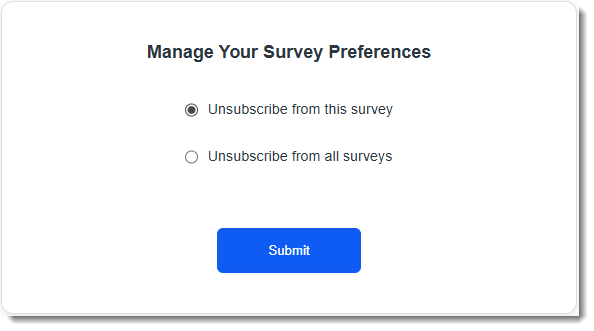
Added Survey "Unsubscribe" Feature and Made Survey Template Selection Required Survey recipients are now allowed to either unsubscribe from the current survey or from all surveys by clicking a link in the survey body which is automatically appended to the end of the survey email similar to the following:
When the link is clicked a "Manage Your Survey Preferences" window displays which allows the user to unsubscribe from the current survey or from all ClientSpace surveys:
To track unsubscribed users, two new recipient tables have been created:
An additional change was made to make the Survey Design field on the Step 2: Content tab of the survey email template (System Admin |
| 76018 |
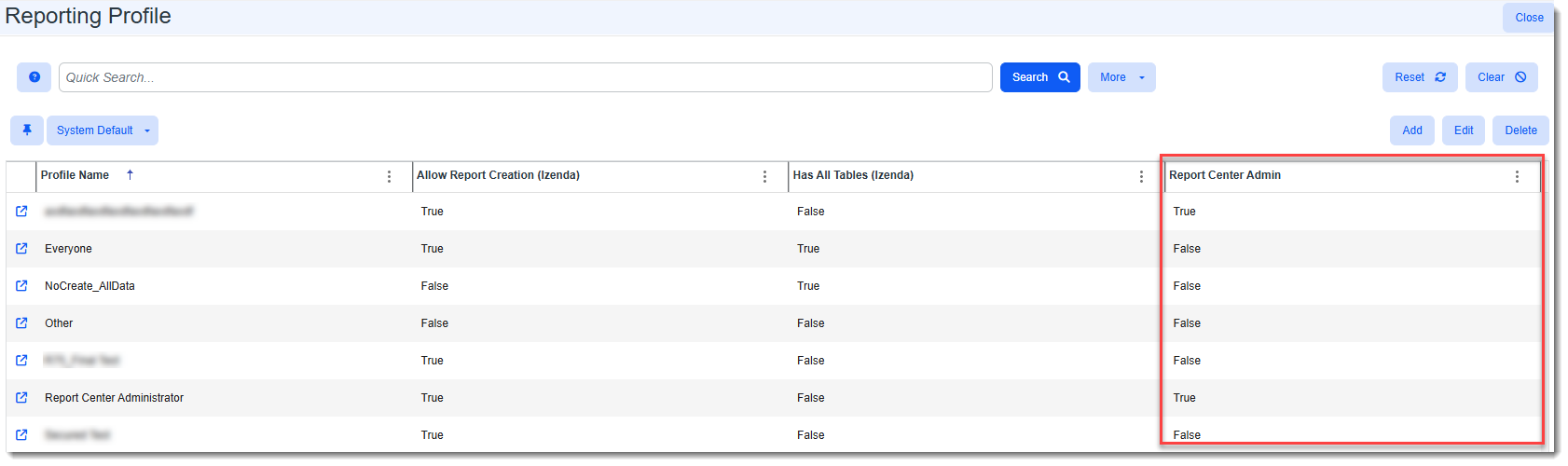
Updated Reporting Profile Configuration to Allow Specifying a Sigma "Report Center Administrator" In preparation for the Business Intelligence model's transition from the Izenda reporting system to the Sigma Report Center reporting system, we have added a new Report Center Administrator profile and a new Report Center Administrator checkbox to the Reporting Profile configuration window (System Admin The Report Center Administrator checkbox is checked by default on the Report Center Administrator profile as shown in the example below:
The Report Center Administrator checkbox is unchecked by default on all other pre-existing Reporting Profiles. This gives a user with Developer access the flexibility of assigning Report Center administrator access to an existing profile. Note: The Report Center Administrator field is visible but dimmed and inaccessible (i.e., grayed) if you are not logged in as a Developer user. When Report Center Administrator is checked on a profile, any existing Tables and Views (on the Action Center of the Reporting Profile record) are copied from the existing Administrator Reporting Profile to this profile. Additional changes include:
See Configuring Security in Business Intelligence Reporting. |



General User Enhancements
|
Case |
Enhancement |
||||||||||
|---|---|---|---|---|---|---|---|---|---|---|---|
|
74942 |
Note: The Global Search feature is currently in a beta test period. To request this feature, please contact your ClientSpace representative or log an extranet case.
When the Global Search bar is enabled, it appears on the Modules bar:
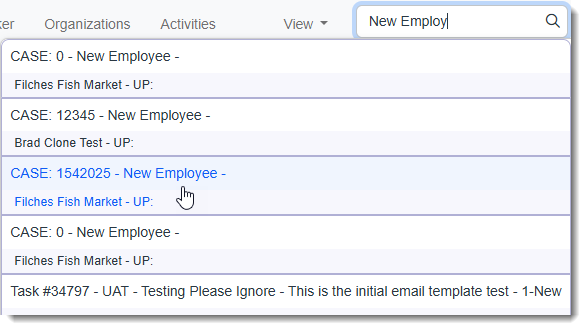
Once configured, it is always visible, allowing you to search the ClientSpace system by keyword or phrase from one location for related cases, tasks, activities, attachments and more. If results are found, they display in a drop-down list:
Click an item in the list to open the associated record. See Searching in ClientSpaceand Global Search. Also see related Case# 74672 (Global Search Configuration). |
||||||||||
| 75740 |
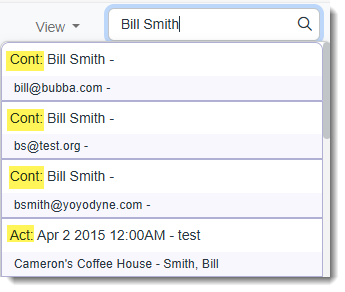
Global Search Results Now Include Prepended CRM Form Type Abbreviation Note: The Global Search feature is currently in a beta test period. To request this feature, please contact your ClientSpace representative or log an extranet case. A form type abbreviation is now being prepended to Global Search results for CORE (i.e., CRM) forms to help users identify results.
The following values are prepended:
Note: CORE forms, also referred to as CRM forms, are system-level forms that comprise the foundation of ClientSpace basic Customer Relationship Management (CRM) functionality. Unlike PEO dataforms, they cannot be modified by a System administrator. CORE forms include: Activities, Organization, Contact, Tasks, Calendar Event, Workspace and Users. See Global Search |

Fixes
|
Case |
Issue summary |
Resolution |
|---|---|---|
|
75621 |
BPM PDF External Report Links Were Not Displaying in BPM |
Previously, PDF custom merge (i.e., external report) links did not display in BPM due to BPM requiring a type of "Merge" instead of "PdfMerge". This issue has been corrected. PDF custom merge link types of "Merge" or "PdfMerge" are now accepted and will be displayed in the Links section of BPM. |
| 76062 |
GraphAPI Email Integration Was Not Ignoring ClientSpace Emails |
Previously, the GraphAPI Email Integration processed emails sourced from ClientSpace (i.e., emails with the IsFromClientSpace flag set in the email header). These emails should not be processed as they could result in case generation looping. Now, the GraphAPI email integration honors the IsFromClientSpace flag. If the flag is set, the email is marked as "Read" and not processed. |