HCM Client Import Merge
The HCM Client Import merge allows you to create an Excel merge record that you can use to transfer data collected in ClientSpace on the following HCM dataforms over to HCM:
- HCM Implementation: Main form that contains the bulk of the HCM Client fields.
-
HCM Implementation - Invoice Line Items: Secondary form that links from the HCM Implementation form.
-
HCM Implementation - Workers Comp: Secondary form that links from the HCM Implementation form.
The transferred details are used to create client records in HCM.
Configuration
Default configuration on the Merge Admin Detail configuration form is located in System Admin > Outputs > Merges in the HCM Client Export record:

The merge record is configured as follows:
-
Name: HCM Client Export
-
Template File: HCMClientImport.xslx
-
Type: Excel
-
Procedure:peo_merge_hcm_excel_companydata
-
Output Type: Excel
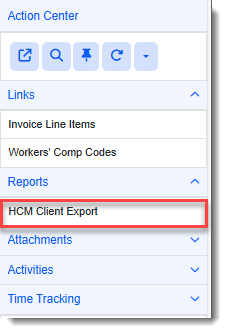
A link to run the merge is located on the HCM Implementation dataform under Action Center > Reports. The link is named HCM Client Export. Clicking it generates the merge (also named HCM Client Export) and deposits it in the Windows Downloads folder.
Note:
-
The HCM Implementation dataforms are located in the Implementation group of the workspace.
-
Currently, we can only include one worker's compensation form and one invoice per HCM implementation record in the merge. The most recent invoice and worker's compensation records for the client are used.
Merge Fields
|
Dataform Label (Field Name) |
Notes |
|---|---|
|
From HCM Implementation |
|
|
Client Number (ClientNumber) |
|
|
Legal Name (LegalName) |
|
|
CSA Type (luCSAType) |
|
|
Client Email (ClientEmail) |
|
|
Address (ClientAddress) |
|
|
City (ClientCity) |
|
|
County (ClientCounty) |
|
|
FEIN (FEIN) |
|
|
DBA (DBAName) |
|
|
Corporation Type (luCorporationType) |
|
|
Client Email (ClientEmail) |
|
|
Contract Start Effective Date (DateContractStart) |
|
|
Contract Stop Effective Date (DateContractStop) |
|
|
Office Phone (ClientOfficePhone) |
|
|
Office Fax (ClientOfficeFax) |
|
|
Other Phone (ClientOtherPhone) |
|
| Allow Independent Contractors (1099) (luIndepContractors) | |
| Full Name (AdminUserFullName) | |
| Username (AdminUserUsername) | |
| Password (AdminUserPassword) | |
| SUTA State (luSUTAState) | |
| State Income Tax ID Number (StateIcomeTaxIDNumber) | |
| WorkState (luWorkStateEETaxDefault) | |
| Effective Date (DateEffectiveEETaxDefault) | |
| State Withholding Taxpayer (StateWithholdingTaxEETaxDefault) |
|
| Federal Withholding Taxpayer (FederalWithholdingTaxEETaxDefault) |
|
| State Withholding (luStateWithholdingEETaxDefaults) |
|
| Workers Compensation State (luWorkersCompStateEETaxDefault) |
|
| SUTA Taxpayer (SUTATaxpayerEETaxDefault) |
|
| WC Carrier (WCCarrierEETaxDefault) |
|
| Other State Tax Taxpayer (OtherStateTaxTaxpayerEEDefault) |
|
| Stop at FUTA Limits? (luFUTALimit) |
|
| Stop at SUTA Limits? (luSUTALimits) | |
| Stop at FICA Limits? (luFICALimits) | |
| Credit back FUTA tax savings from section 125 and 401k? (luFUTASavings) | |
| Credit back SUTA tax savings from section 125 and 401k? (luSUTASavings) | |
| Credit back FICA tax savings from section 125 and 401k? (luFICASavings) | |
| Credit back Workers Comp tax savings from section 125? (luWorkersCompSavings) | |
|
Disclose limit and tax savings on the invoice? (luLimitSavings) |
|
|
Post-tax savings on the invoice from section 125 and 401k? (luPostTax) |
|
|
Post balance due from prior invoices on the invoice? (luPostBalance) |
|
|
Invoice at divisional Level? (luInvoiceDivision) |
|
|
Display invoice for Client Users? (luInvoiceClientUser) |
|
|
Send Invoice To This Address (luAddressInvoice) |
Decode value only. |
|
Billed Social Security (BilledSocialSecurity) |
|
|
Billed Medicare (BilledMedicare) |
|
|
Billed FUTA (BilledFUTA) |
|
|
SUTA State (luSUTAStateTax) |
|
|
SUTA Rate Notice Effective Date (DateSUTAEffRate) |
|
|
Billed SUTA Tax (BilledSUTATax) |
|
|
Actual SUTA (ActualSUTATax) |
|
|
From HCM Implementation - Invoice Line Items: |
|
| Fee (Fee) | |
| Payment Method (luPaymentMethod) | |
| Based On (luBasedOn) | Code value only. |
| Fee Period (luFeePeriod) | Code value only. |
| Charge Frequency (luChargeFrequency) | Code value only. |
|
Per EE (luPerEE) |
Code value only. |
|
Start Date (DateStart) |
|
|
End Date (DateEnd) |
|
|
Bill (luBill) |
Code value only. |
|
GL Code (GLCode) |
|
|
Surcharge Description (SurchargeDesc) |
|
|
From HCM Implementation - Workers Comp: |
|
| State (luState) | |
| Comp Code (CompCode) | Code value only. |
| Rate (Rate) | Decode value only. |
| Billed Rate (BilledRate) | |
| Start Effective Date (DateStart) | |
| End Effective Date (DateEnd) | |
| Charge for Premium Pay (luChargeForPremiumPay) | |
| Billed Rate for Premium (BilledRatePremium) | |
| Description (Description) | |
Running the Merge
To run the merge:
-
Access the workspace.
-
From the modules bar, click
 Workspaces.
The Workspace Search dashboard opens.
-
Type % followed by the Client Number or by the first few letters of the workspace name in the search box to filter the list of workspaces.
Note: You can also use More search to filter the list of Workspaces by fields such as Group, Template, or Create Date range.
-
Then, double-click the workspace row in the grid or click
 (Open) next to the workspace name.
-
-
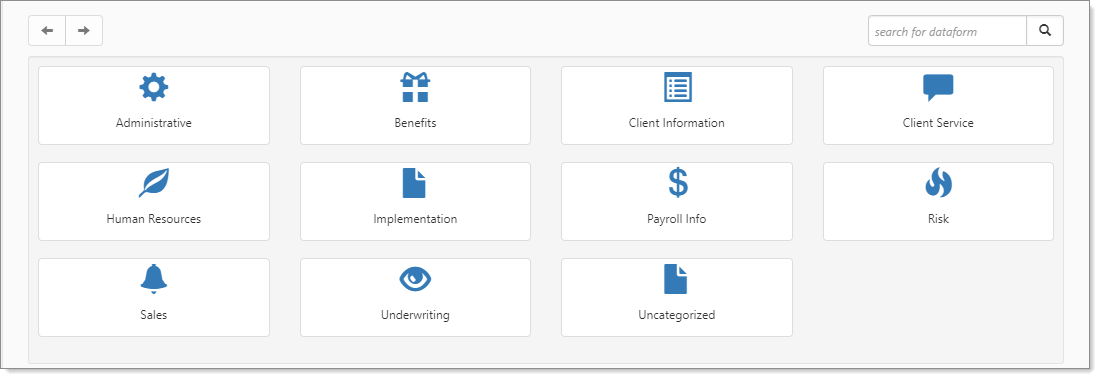
Move down the page to the administrative tiles where you see the dataform categories.
-
Enter "Implementation" in the search for dataform field and then click the HCM Implementation tile. The HCM Implementation dataform displays.
-
In the Action Center, under Reports, click HCM Client Export to run the report.
-
Retrieve the HCMClientImport.xlsx document from your Windows Downloads folder.