Flagging Favorite Reports
Note: All ClientSpace reports are currently held in an "Uncategorized" container within Report Center. We are working on adding the ability to place reports in categories. Setting favorite reports may help organize reports in the interim by reducing searches for frequently accessed reports.
To flag Favorite reports:
-
On the Report Center Home
 page, locate the report tile (by using the Search bar at the top of the page or by scrolling the list of available reports).
-
Click the Favorite
 icon on the report tile. The Favoriteicon becomes solid red.
-
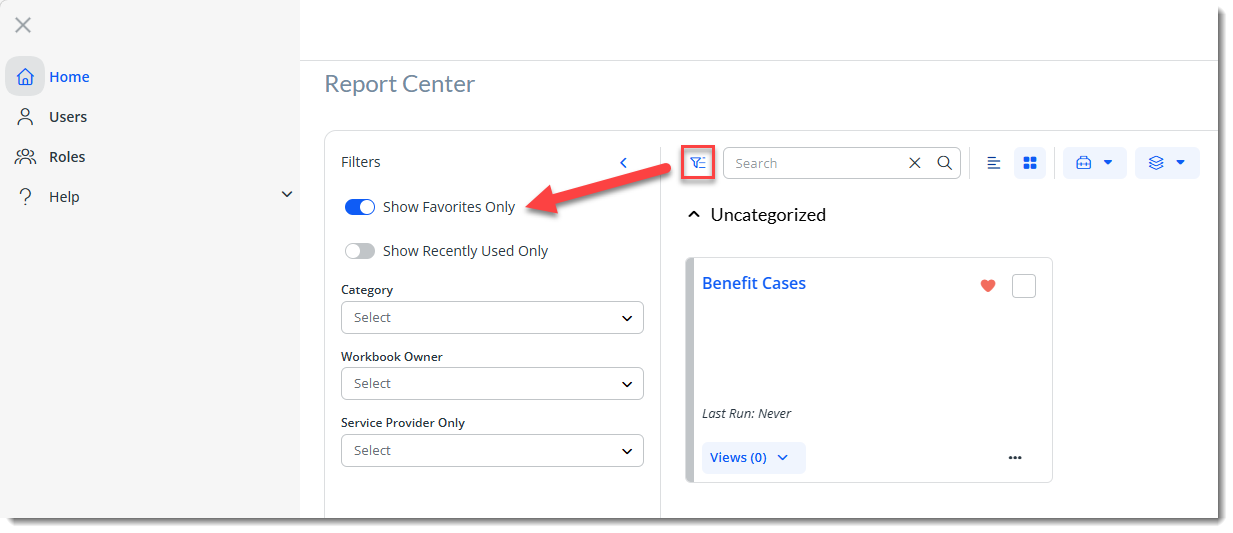
Optionally, filter the report list to show only favorites by clicking the Filters
 icon located next to the Search field to display report filter options and then selecting Show Favorites Only.
-
Creating ClientSpace Custom Dataform Links Using Report Center Workbooks or Views
-
Creating ClientSpace Widgets Using Report Center Workbooks or Views