Connecting Multiple Salesforce API Instances to a Single ClientSpace Installation
In this topic we cover an overview and the steps required for the ClientSpace setup of multiple Salesforce API instances to a single installation of ClientSpace. The ClientSpace team member assigned to assist you with the implementation performs many of these steps but may call on a designated person at your company to assist if needed.
Overview
By using multiple Salesforce API Configurations, data from multiple Salesforce instances (i.e., multiple tenants) can be imported to and exported from a single ClientSpace installation.
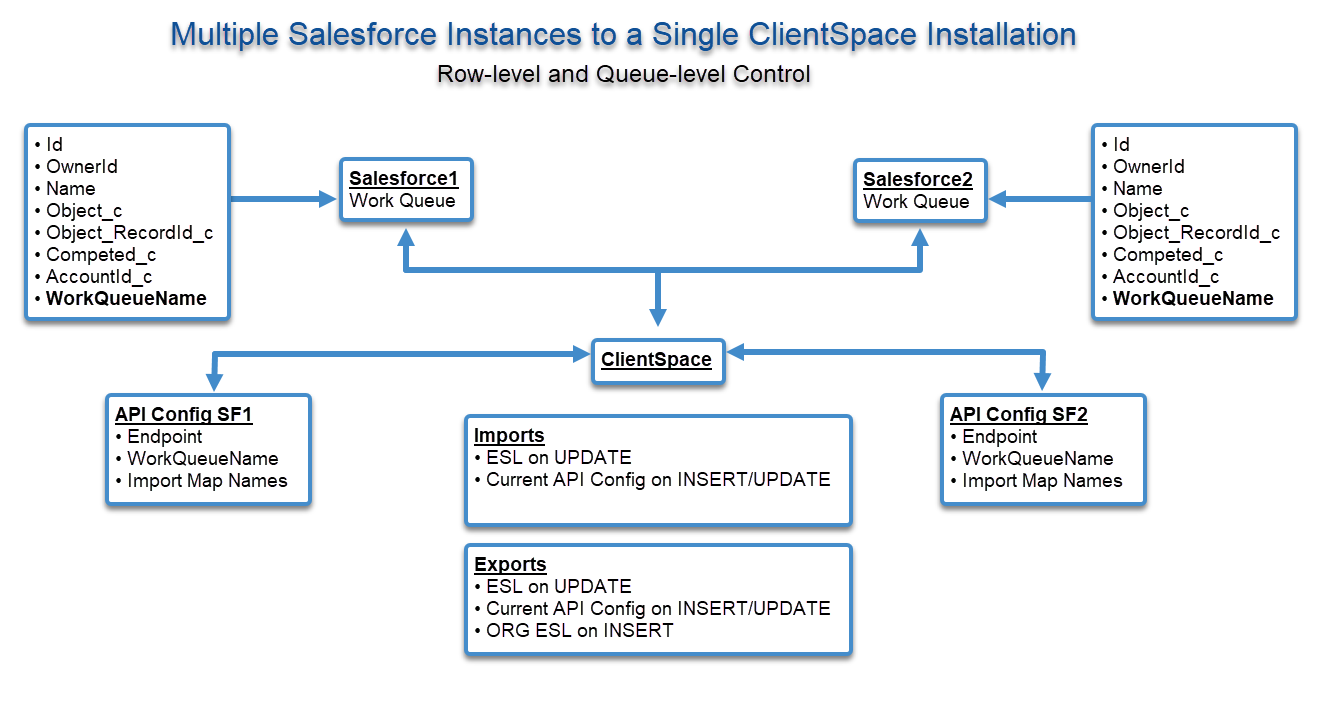
By utilizing import and export maps for each instance, administrators can map fields from each Salesforce instance to the respective forms and fields in the ClientSpace instance.
ALERT: This is an important step requiring careful attention as a custom field on one Salesforce instance may not exist in another Salesforce instance.
How Data Integrity is Maintained Across Salesforce Instances Using ESLs
External Source Linking (ESL) records are used to maintain multi-tenancy within ClientSpace. Each ESL record links a ClientSpace Object (CSObject) with a Salesforce Object (SFObject) for a specific API Configuration. Though unlikely, a CSObject could be available in multiple Salesforce instances. If that were to happen, there will be a unique ESL record for each that links the CSObject to the correct Salesforce instance.
Configuration Specifications for Implementing Multiple Salesforce APIs
Detailed steps for setting up a Salesforce API Configuration can be found in Configuring the Salesforce API in ClientSpace. The steps still apply except that instead of setting up one Salesforce API configuration, you will set up multiple APIs all pointing to the same instance of ClientSpace. To keep each Salesforce instance distinct, there are some minor specifications to which you must adhere. These are detailed as follows:
API Naming Convention
API Configurations must be named "SFDCDEVx" and "SFDCDEVy" or "SFDCPRODx" and "SFDCPRODy" in the Application Code field of the Salesforce API record. Refer to Configuring the Salesforce API in ClientSpace.
About API Settings and Additional Parameters
All general API settings and additional parameters on each API Configuration will be treated as separate and distinct from each other. During processing, general API settings and additional parameters will be honored for the API Configuration being processed. Refer to Configuring the Salesforce API in ClientSpace for API general settings and Additional Salesforce Parameters for the complete list of available API parameters.
ALERT: Pay particular attention to the additional parameter workqueueinstance. You must specify a unique WorkQueue Name on each Salesforce API configuration record that corresponds to each Salesforce installation. Also, we recommend setting the createnewsfaccount parameter to 0. As explained earlier in this article, ClientSpace uses ESL records to link a CSObject to an SFObject. However, when exporting a new ORG record, an ESL record will not exist, therefore, the process cannot determine which API Config to export it to. It will be exported to the first API Config Salesforce instance. For this reason, we highly recommend that exporting new ORGS is avoided by setting the additional API parameter of createnewsfaccount to 0 when configuring multiple Salesforce instances to one ClientSpace installation.
Import and Export Mapping: Source File Naming Convention
When connecting multiple Salesforce API instances to a single ClientSpace installation using a standard configuration of two-way (i.e., import/export) Salesforce APIs, there must be an import and export mapping file for each instance of the Salesforce API. Each should have a unique name in the Source File field of the mapping header record:
Export Source File Name
"SFORCE_export_mappingx*.csv", "SFORCE_export_mappingy*.csv", etc.
Import Source File Name
"SFORCE_import_mappingx*.csv", "SFORCE_import_mappingy*.csv", etc.
If you do not specify the names, the following default names are used for all map header files: "SFORCE_import_mapping*.csv" and "SFORCE_export_mapping*.csv". This will not work for a multi-instance configuration since the Salesforce mapping header file names will not be unique for each instance.
See Configuring Import/Export Mapping details.
About Multi-Threading
As mentioned in an earlier section, the Scheduled Process can be set up to run a single API Config at a time. This is the default or "out of box" configuration. It can also be configured to process more than one API Config concurrently. To do this a developer user must access the Scheduled Process table column ParameterXML via the database and enter an appropriate setting:
-
Empty - This is the default setting that runs one API Configuration at a time. Running a singular instance at a time increases the length of time the Scheduled Process runs but has minimal impact on system performance.
-
1 or more - This runs that number of API Configurations at a time. Running multiple threads at a time can decreases the length of time the Scheduled Process runs but can impede system performance.
ALERT: Use caution when increasing the thread count, as this can impact ClientSpace system performance.
How Data is Processed
Once configuration is complete, the Scheduled Process iterates through one Salesforce API Configuration and processes the data before the next Salesforce API Configuration is processed.
Note that the Scheduled Process can optionally be configured as multi-threaded to process more than one Salesforce API at a time but careful testing must occur to ensure that system performance is not negatively impacted.
Overall, any changes made to accommodate having multiple Salesforce API configurations to a single ClientSpace instance will not affect existing configurations that have only a single Salesforce API Configuration.
Import Processing Logic
-
Each API Configuration retrieve data from the WorkQueue of the associated Salesforce Instance
-
The SFObjects are imported into ClientSpace and processed using the following logic:
-
If an ESL record exists for the CSObject/APIConfig, that CSObject will be updated
-
If an ESL record does NOT exist for the CSObject/APIConfig, the CSObject will be imported and an ESL record will be created for the CSObject/APIConfig.
-
Export Processing Logic
-
Each API Config will retrieve Field Audit Change (FAC) data from the same FAC table.
-
The csavailableupdates stored procedure will be used and there can be different csavailableupdates stored procedures for each API Config.
-
CSObjects are processed using the following logic:
-
If a CSObject to be processed has an existing External Source Linking record, the CSObject will be pushed to the SF Instance if the ESL record is associatedwith the API Config record in progress.
-
If a CSObject to be processed does NOT have an existing ESL record, it will check the Organization (ORG) associated with that CSObject.
-
If the ORG ESL exists for the API Config being processed, the CSObject will be pushed to that SF Instance
-
If the ORG ESL does not exist for the API Config being processed, it will NOT be pushed to that SF Instance.
Exception:When exporting a new ORG, an ESL record will not exist, therefore, the process can not determine which API Config to export it to. It will be exported to the first API Config Salesforce instance. For this reason, we highly recommend that exporting new ORGS is avoided by setting the additional API parameter of createnewsfaccount to 0 when configuring multiple Salesforce instances to one ClientSpace installation.
-