Configuring Users Import to Insert/Update External Users
To configure the standalone user import (IMPORT_user*.csv) to insert/update both internal and external users (instead of only internal users), you must make a configuration change to add an Import Map Detail record (i.e., field) on the IMPORT_user*.csv Map Header Detail record named DefaultWorkspace.
To add the DefaultWorkspace Import Map Detail record:
-
Go to System Admin
 > Advanced > Configure Import.
 -
Locate and open IMPORT_user*.csv.
The Import Map Header Detail form displays.
-
In the right pane, click Fields.
-
Click Add.
The Import Map Detail form opens.
-
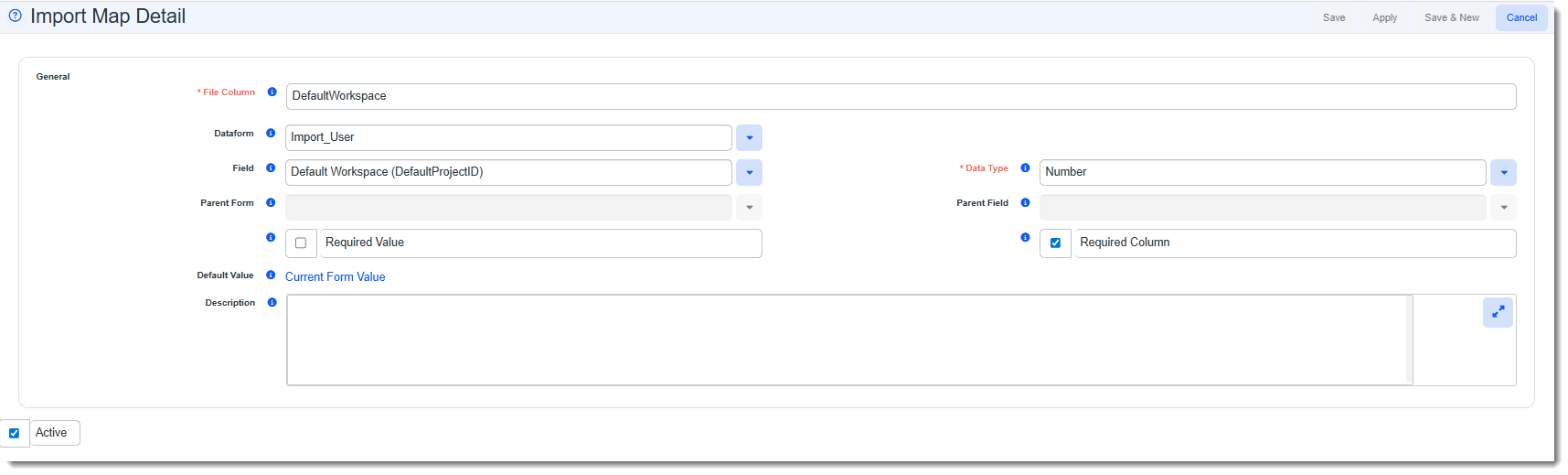
Complete the required fields exactly as indicated below:
File Column
Enter DefaultWorkspace.
Dataform
Select Import_User.
Field
Select Default Workspace (DefaultProjectID).
Data Type
Select Number.
Required Value
Leave unchecked.
Required Column
Select the field. A check mark should be visible in the field.
Description
A short description of the imported data being imported, such as the data source. For example, "Payroll System, Client Address 1 field."
Active
The Active checkbox must be checked.
When you are finished completing the fields, the Import Map Detail record should appear as follows:
-
Click Save.
Additional Notes:
-
When importing user records, be certain that the User Type (Internal or External) is correct before importing the records to avoid issues. For instance, if an Internal user record is incorrectly set to a User Type of "External" and a Default Workspace is also entered, once their user record is inserted/updated in ClientSpace, they will only be able to access the identified default workspace. Similarly, if an External user record is incorrectly set to a User Type of "Internal", access to all workspaces will be unlocked for them upon import.
-
For a new External user, if the import file column for Default Workspace is empty, the row will not be inserted/updated and the following error message is logged (System Admin
> Import > Manage Import > open import record > View Log File): "Business Logic Errors for data row {RowNumber} [{ImportID}]: - Error saving User for ImportID {ImportID}: A Default Workspace must be provided for NEW External Users, ImportID {ImportID}".
-
For an existing External user, if the import file column for Default Workspace is empty, the previously entered Default Workspace value will be preserved.