Multi-Client Access
External users can navigate between multiple clients in BPM. The user can log as any client where they are added as a BPM Contact on the Benefits Batch (by using the credentials received in the BPM notification email for one of the client batches). Once logged in, they can click the drop-down list in BPM on the left pane and navigate between client batches.
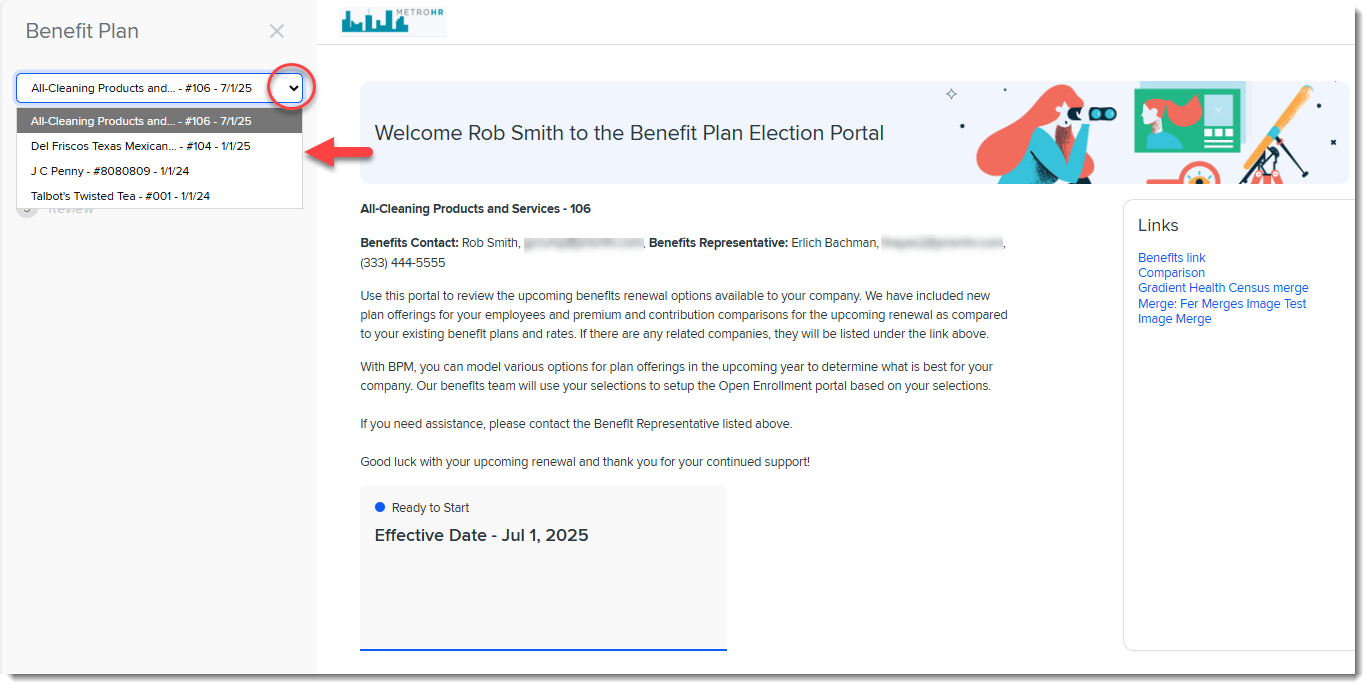
Clicking a batch in the list refreshes the Welcome page and shows the Benefits Batch card for the selected client.
Note:
-
The list includes all batches where the external user is added to the Benefits Batch as a BPM Contact. The batches do not have to be related (i.e., in a parent to child or child to parent relationship) to appear in the list.
-
Assigned access permissions (i.e., Edit or View Only rights) on the BPM Contact record are evaluated and respected for each client batch in the list.
-
The batches must be Active and in Client Review status to appear in the list.
-
Only users who log in with an external link can see the drop-down list on the left pane. Internal users who click the Internal BPM Access link on the Benefits Batch will not see it.
-
The list is only available on the BPM Welcome page.