Group Benefits Import PHRAPI Import Mapping
The Group Benefits Import API uses an import map header file named PHRAPI_special_groupBenefits*.csv which is preconfigured for you. The import map header points to a custom import class named ClientSpace.PEO.Import.PrismGroupBenefitPlan which contains the pre-processing logic used to build the import file. One row per Benefit Plan ID is added to the import file which is then used to either update or add PrismHR benefit plans to ClientSpace.
The import map header contains seven mapped fields:
-
CarrierPlanCode
-
EffectiveDate
-
OfferTypeCode
Note: This field is used by the custom import class to map the Associated Offer Type(s) metadata on the Benefit Plan Category lookup to that Benefit Plan category.
-
PayeeID
Note: This field is used by the custom import class to map the Carrier Organization from PrismHR to the Payee ID on the ClientSpace organization record.
-
PlanTitle
-
Status
-
UniquePlanCode
To view the import mapping for the Group Benefits Import API:
| 1. | Go to System Admin > Advanced > Configure Import. > Advanced > Configure Import. |
The Import Map Header Search dashboard opens.
| 2. | Locate PHRAPI_special_groupBenefits*.csv. |
| 3. | Click  (Jump) to open the header detail record. (Jump) to open the header detail record. |
The Import Map Header Detail record opens for PHRAPI_special_groupBenefits*.csv:
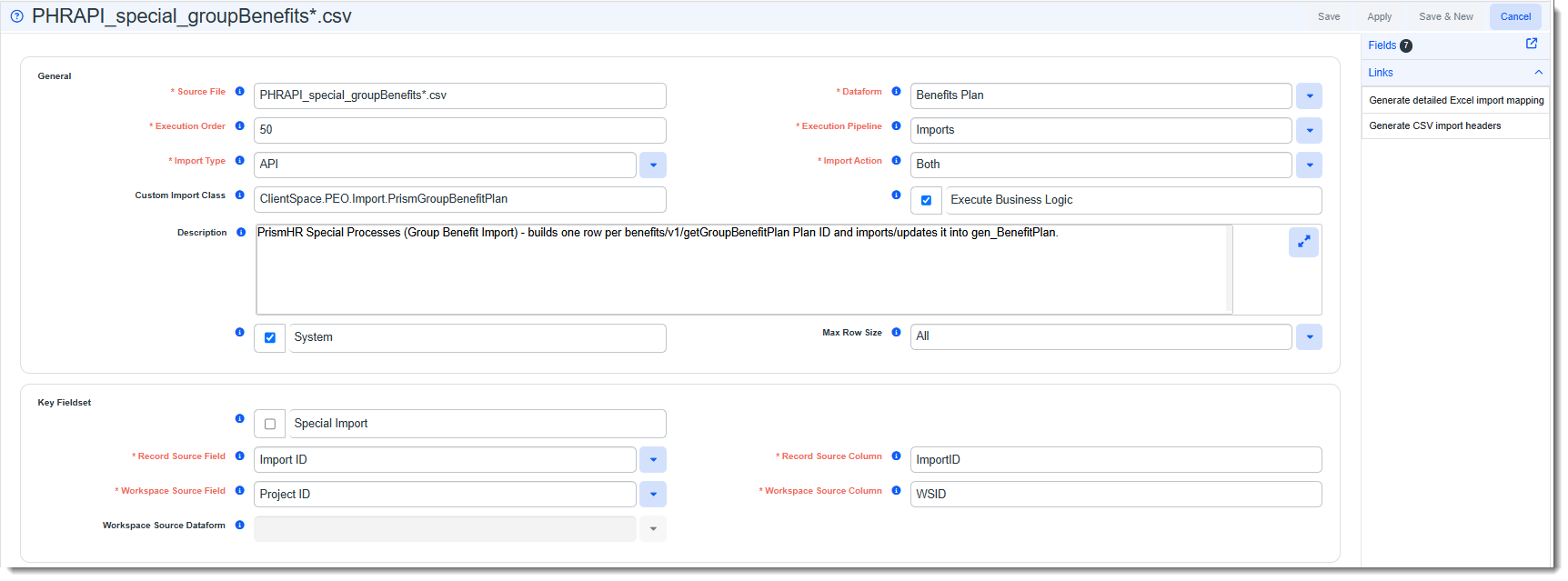
| 4. | To view the fields, click Fields. |
The Import Map Search list displays the mapped Special PrismHR Processes fields contained in the import file.